
The Signing Key Lifecycle: Generate, Back Up, Never Commit, Wire Into CI
Losing an Android release signing key means every future update is permanently impossible. Here is the full lifecycle: generate once, back up twice in different failure domains, and wire four secrets into GitHub Actions with an unsigned fallback for forks.
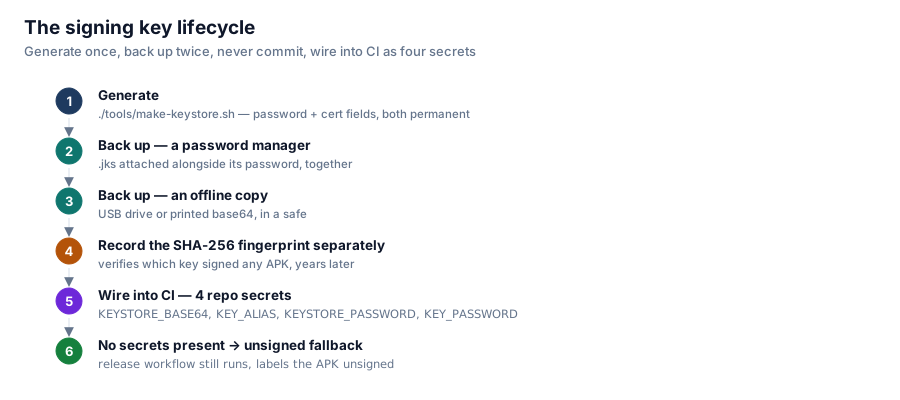
An Android app's signing key is its permanent identity. Android will only accept an update to an installed app if it's signed by the exact same key as the version already on the device. Lose the key, and you haven't lost a convenience — you've lost the ability to ever update that app again for anyone who has it installed. There is no recovery process, no "contact support," nothing. So the lifecycle around this one file deserves more care than most .gitignore entries get.

Generate once, back up twice, record the fingerprint, then wire it into CI as four secrets with a fallback for forks that don't have them.
Generate it once
./tools/make-keystore.shThis prompts for a password and certificate details, and both are permanent in a way that's easy to underestimate: the password cannot be reset later, and the certificate fields can't be edited once baked into the key. PKCS12 keystores (the modern default) use a single password for both the store and the key inside it, which simplifies the CI wiring later — KEYSTORE_PASSWORD and KEY_PASSWORD end up being the same value.
Back it up in two different failure domains
Losing this file is unrecoverable, so "back it up" means somewhere that survives losing your primary machine, not a second copy sitting next to the first one:
- A password manager. Attach the
.jksfile itself, alongside its password, in the same entry. This is the most useful copy specifically because the file and the password it needs travel together — a password with no file, or a file with no matching password, is equally useless. - An offline copy. A USB drive in a drawer, or base64-encoded text printed and put in a safe. Something that survives losing this machine and your cloud accounts at the same time, which a password-manager-only backup does not.
- Not in the repository, not in a public cloud folder, not pasted into a chat message — anywhere it could be exfiltrated by a leak unrelated to the key itself.
Also record the SHA-256 fingerprint the script prints, somewhere separate from the key files. Years from now, it's the only way to verify which key signed a given APK without having the keystore in hand.
Wire it into CI as four secrets
Under Settings → Secrets and variables → Actions:
| Secret | Value |
KEYSTORE_BASE64 | base64 -w0 photo-cleaner-release.jks |
KEY_ALIAS | the alias chosen at generation (default photocleaner) |
KEYSTORE_PASSWORD | the password chosen at generation |
KEY_PASSWORD | the same password (PKCS12) |
The release workflow decodes the base64 secret to a temp file, hoisted at the job level rather than the step level deliberately:
env:
  KEYSTORE_BASE64: ${{ secrets.KEYSTORE_BASE64 }}
The comment in the workflow explains why: secrets isn't available inside a step-level if: condition in GitHub Actions, but env is. Hoisting the secret to a job-level env var is what makes the next part — optional signing — actually work as a conditional.
The unsigned fallback that makes forks work
- name: Sign APK
  if: steps.keystore.outputs.present == 'true'
  ...
- name: Stage unsigned APK
  if: steps.keystore.outputs.present != 'true'
  run: |
    cp app/build/outputs/apk/release/app-release-unsigned.apk \
       "photo-cleaner-${VERSION}-unsigned.apk"
If someone forks the repository and pushes a tag without configuring any of the four secrets, the workflow doesn't fail — it builds an unsigned APK, labels it clearly as unsigned in the filename, and publishes that instead. Forks get a working CI/CD pipeline on day one with zero configuration, and nobody is tempted to commit a throwaway signing key to their fork just to get the release job green.
Verifying what you signed
"$APKSIGNER" verify --verbose "photo-cleaner-${VERSION}.apk"This runs unconditionally after signing, in CI, on every release. It's a small check, but it turns "the workflow didn't error" into "the signature is actually valid," which is exactly the distinction you want automated the one time your entire user base's ability to update depends on it.
Series: Google Photos Cleaner.