
Deploy a Suspended CronJob, Run It Once, Then Trust the Schedule
A nightly job against a fresh secret is how you get pager noise at 03:15 UTC. The GitOps-safe order: deploy suspended, verify by hand, then unsuspend.
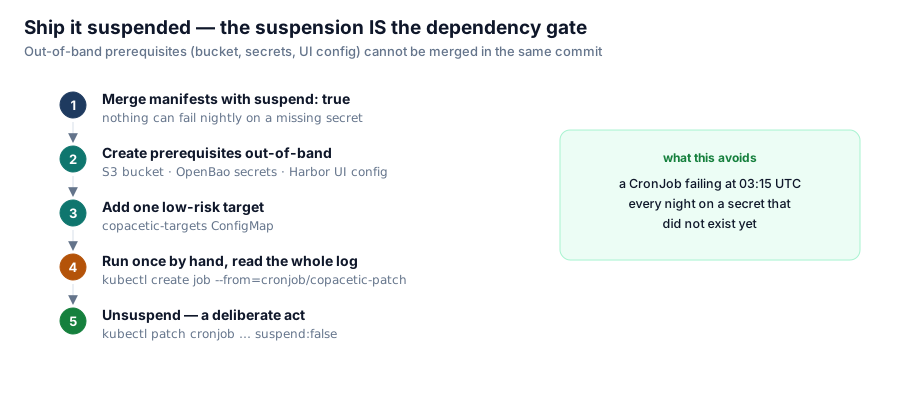
Our Copacetic patcher ships as a Kubernetes CronJob that is suspended in Git. That is not an accident or an oversight; it is a deliberate deployment pattern that has saved us from a class of 3 a.m. failures.
The problem with "deploy and wait for the schedule"
The job's prerequisites are not deployable in the same commit:
- An S3 bucket must exist (created out-of-band, outside Flux).
- OpenBao secrets must exist (robot-account credentials for the registry).
- Post-install registry configuration must be done through the UI.
Flux will happily create the CronJob without any of those. The first concurrencyPolicy: Forbid-adjacent fire at 03:15 UTC then fails on a missing secret, and keeps failing every night until someone notices. A suspended deployment means nothing can fail nightly on a prerequisite that does not exist yet, no matter how long the gap between merges.
The order that works

The suspension is the dependency gate; the manual run is the cheapest integration test you will ever write.
- Merge the manifests with
spec.suspend: true. - Create the out-of-band prerequisites (bucket, secrets, post-install config).
- Add one low-risk target to the ConfigMap.
- Run the job once, by hand, and read the whole log:
kubectl -n copacetic create job --from=cronjob/copacetic-patch patch-first-run
kubectl -n copacetic logs -f job/patch-first-run- Only then:
kubectl -n copacetic patch cronjob copacetic-patch -p '{"spec":{"suspend":false}}'The manual create job --from=cronjob/... trick is the workhorse here: it runs the exact pod the schedule would run, without waiting for midnight and without committing anything. If the log ends in a success summary, the schedule will succeed; if it ends in a stack trace about credentials, you have saved yourself thirty nightly alert emails.
Why kubectl patch and not a merge for the unsuspend
Yes, this is a GitOps cluster where manual edits get reverted. The unsuspend is one of the few sanctioned imperative actions, and the reason is sequencing: Flux reverts within 30 minutes, but the purpose of the suspension — gate on out-of-band prerequisites — has been satisfied by the time you run it. If you want the cluster state tracked in Git instead, make step 5 a merge with suspend: false; just be aware that a revert to suspend: true now re-suspends a working job, which is usually what you want anyway.
The same pattern applies to the exclude-list: the deny-list ConfigMap is managed in Git, never kubectl edit — drift detection would revert the edit within the hour. Imperative change is not banned in GitOps; it is rationed to actions that are either temporary (run-once verification) or effectively irreversible decisions (unsuspend after verification).
The general rule
For any scheduled job whose prerequisites live outside your deploy pipeline:
- Ship it suspended. The suspension is the dependency gate.
- Run once manually.
create job --from=is the cheapest integration test you will ever write. - Read the whole log. Not the exit code — the log. "It exited zero but the list it printed was empty" is a very common and very quiet failure.
- Unsuspend last, as a deliberate act.
This pairs naturally with GitOps suspension as a rollback primitive, too: flux suspend helmrelease harbor stops reconciliation of a misbehaving release without deleting anything, and kubectl patch cronjob ... suspend:true stops a nightly writer while you investigate. Suspension is the gentlest tool in the GitOps toolbox precisely because it changes nothing else.
Series: Building a Container Image Security Stack. Next: the 1.5 MiB limit that silently discards your largest images' scan reports.