
Handling WebView Renderer Death Instead of Pretending It Won't Happen
Android's WebView runs its rendering in a separate process that can be killed under memory pressure at any time. Ignore that and the whole app dies with it. GPhotosSession.kt treats it as a routine, recoverable event.
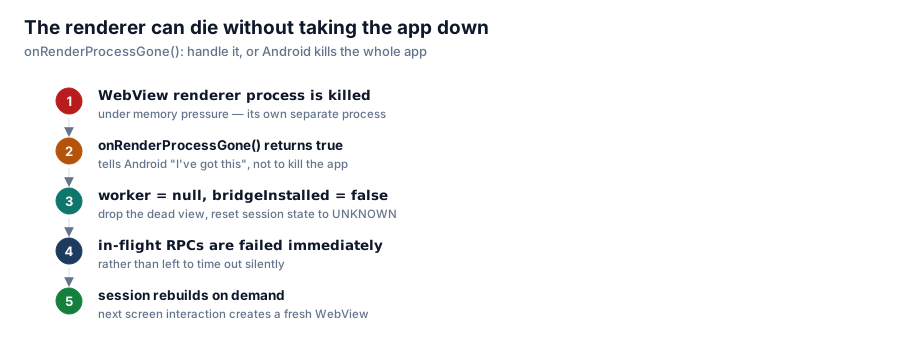
Building the core of this app around a real embedded WebView (rather than forging requests, as covered earlier in this series) buys authentic browser traffic and no forged headers. It also means inheriting a failure mode most apps never think about until it happens to them in production: the WebView's renderer process can simply be killed, out from under you, at any time.

onRenderProcessGone(): handle it, or Android kills the whole app.
Why the renderer can die at all
On modern Android, WebView content doesn't render inside your app's own process — it runs in a separate, sandboxed renderer process, the same architecture Chrome itself uses to isolate tab crashes from the browser shell. That isolation is good for security, but it means the renderer is a process the system can kill under memory pressure, independent of your app's own lifecycle. A photo-review app holding a lot of image data in memory, on a low-RAM device, is a plausible candidate for exactly that kind of pressure.
The default outcome if you don't handle it
WebViewClient.onRenderProcessGone() is the callback Android fires when this happens. If you don't override it, or if your override returns false, the documented behavior is that Android kills your entire app process, not just the WebView. From the user's perspective, the whole app just vanishes — no crash dialog explaining why, no chance to preserve state, nothing.
What GPhotosSession.kt does instead
/**
 * The WebView renderer runs in its own process and can be killed under
 * memory pressure. If this returns false, Android kills the whole app —
 * so handle it, drop the dead view, and let the session rebuild on demand.
 */
override fun onRenderProcessGone(
    view: WebView?,
    detail: android.webkit.RenderProcessGoneDetail?,
): Boolean {
    if (view === worker) {
        worker = null
        bridgeInstalled = false
        _state.value = State.UNKNOWN
        // Any in-flight RPCs will never be answered; fail them now rather
        // than leaving callers to time out.
        ...
    }
    return true
}
Returning true tells Android "I've handled this, don't kill the app." Everything after that is cleanup: the dead WebView reference is dropped, the injected JS bridge is marked as no longer installed, session state resets to UNKNOWN, and any RPC calls waiting on a response from that now-dead renderer are failed immediately instead of hanging until some timeout expires.
Why failing in-flight calls immediately matters
This is the detail that's easy to skip and expensive to skip. Without it, a delete or trash operation issued right before the renderer died would sit in limbo — the caller doesn't know it failed, doesn't retry, and doesn't tell the user anything went wrong. Explicitly failing those calls the moment the renderer is confirmed dead means the UI layer can show "that didn't go through, try again" instead of a request quietly disappearing into a session that no longer exists.
Rebuilding on demand, not eagerly
The session doesn't try to eagerly recreate a new WebView the instant the old one dies. It resets to UNKNOWN and waits for the next actual interaction — the next swipe, the next screen — to trigger a fresh session build. That keeps the recovery path simple: there's exactly one way a session gets created (on demand, from whatever the current screen needs), whether that's the very first launch or the fifth renderer death of the day.
The general lesson
If your app embeds any component that runs in its own OS-managed process — a WebView, a plugin host, a media codec — assume the platform will kill that process at a moment neither of you chooses, and design the failure path before you need it. The alternative isn't "this rarely happens so it's fine" — it's an app that mysteriously vanishes on exactly the devices under the most memory pressure, which are often the same devices with the largest photo libraries and the most reason to be running this app in the first place.
Series: Google Photos Cleaner.