
Why I run my VPS from a chat topic on my phone instead of SSH
How a question about logging expenses from my phone became a ChatOps listener on a private ntfy server: rebuilt four times in a day, then broken in four instructive ways once it met the real server.
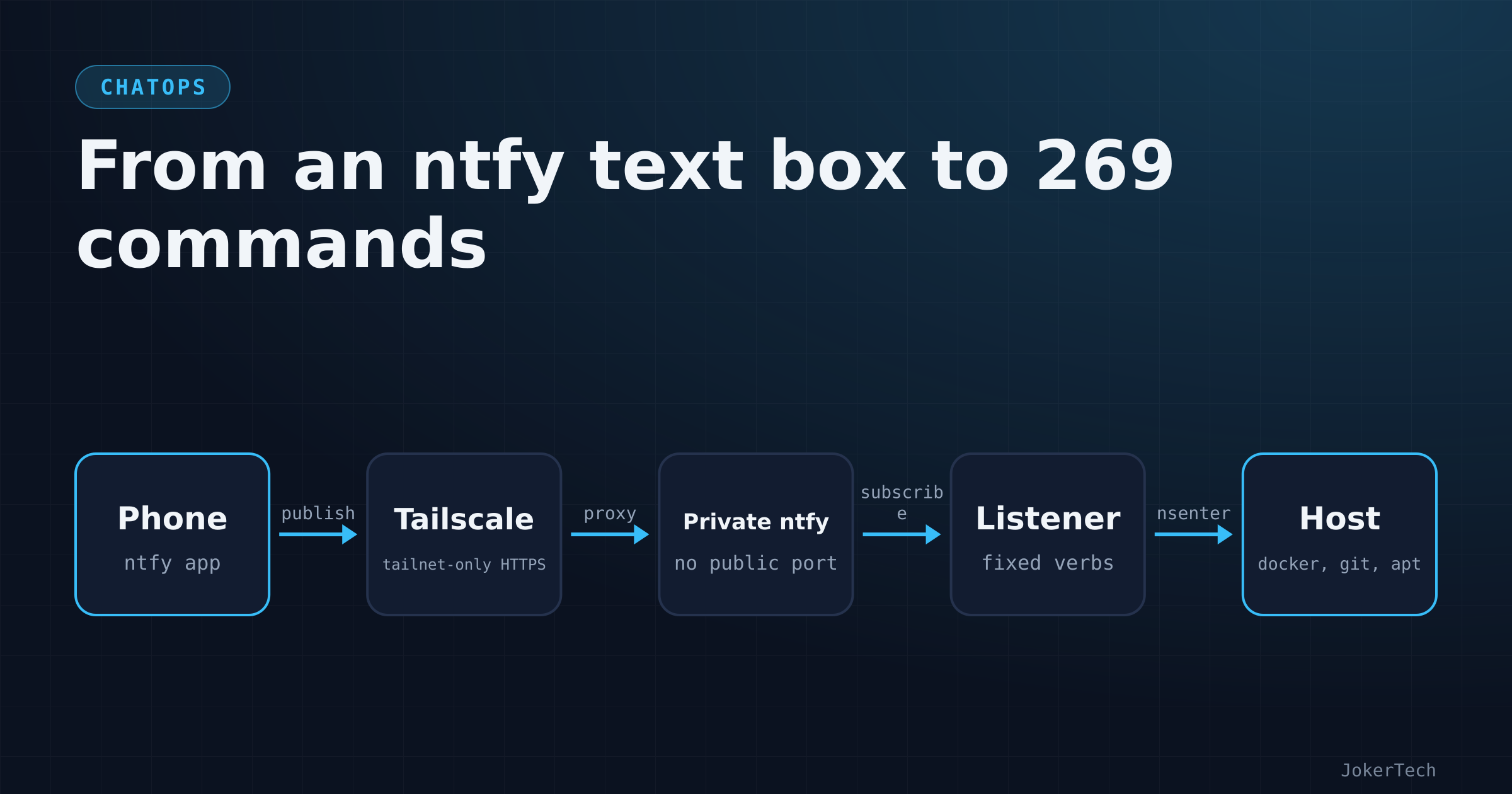
It started with a question I asked half as a joke. I had just set up ntfy so that Uptime Kuma and my NocoBase reminders could push to my phone, and I noticed that the ntfy app has a text box. You can publish from it, not only read. So I asked, more or less in these words: what automation could I have so that when I send something, it triggers things on other apps? Could I manage my finances in NocoBase by sending a message from the ntfy app? And if not with this, is there an application that does it?
Two days later the answer is a listener on my VPS that understands 269 commands across twelve chat channels, with three risk tiers, a second factor for anything destructive, a kill-switch, an audit log and 103 offline tests. I'm a little embarrassed by how fast that grew, and more than a little interested in how it broke once it met the real server. This post is the overview: why chat at all, what the pieces are, how the design moved four times in one day, what went wrong in the first real use, and what it costs me to keep. The other posts in this series go deep on the individual parts.
The jobs I actually want to do from a phone
My stack is one VPS with a few dozen Docker Compose projects, all living in one git repo. I change things on my laptop, push, and on the server I git pull and run docker compose up -d in the right folder. That's the whole deployment process. It's boring on purpose, and it's fine when I'm at a desk.
It is not fine on a phone. SSH clients on phones work, technically. Typing cd /srv/docker/kavita && docker compose logs --tail 50 on a glass keyboard while autocorrect turns compose into compost is a special kind of misery. And the jobs I want to do away from a desk are small. Is everything up? Why is this one app throwing errors? Restart it. Pull the config change I pushed from the laptop an hour ago. Add a backlog item before I forget it. Log that I paid a bill. Those are five-word tasks. They don't deserve a terminal session, a key on the phone, and an open SSH port I have to think about.
So the requirement, once I wrote it down, was narrower than "remote control of the server". It was a short list of verbs, typed in a few words, from the app where I already read my alerts, with the answer coming back in the same place.
Why not a web panel, or just better SSH
The obvious alternative is a web panel. There's even one sitting in my repo: a container-management panel I'd tried earlier, still on the deny list today. Its compose file opens with a warning I wrote myself when I set it up:
# WARNING: the panel manages Docker, so it needs the Docker socket. Whoever
# logs in to this panel effectively has root on the host. Unlike Traefik (which
# goes through docker-socket-proxy, read-only), this gets the raw socket.
# Keep it behind strong auth, and consider restricting it by IP / Cloudflare
# Access.
That's the trade with every panel of that kind. It's a website, it has a login form, and behind the form is root. I'd have to expose it, or tunnel it, and then trust its authentication code and its update cadence. It also does far more than I want. I don't need a GUI to edit compose files; I have git for that. I need status, logs and update.
The read-only tools I already run cover part of it. Dozzle shows container logs in a browser, behind Authelia. Uptime Kuma tells me what's down. Neither can restart anything, which is correct for them, and both are a browser login away, which on a phone is slower than it sounds.
Better SSH (a proper mobile client, saved snippets, Mosh) would fix the typing but not the shape: an interactive root shell is still the most dangerous thing you can hand a phone, and it's exactly the thing I'd least like to use from a bus.
A chat channel turned out to be a smaller thing to trust. The listener only knows a fixed list of verbs. There's no "run this command" box anywhere, no shell, and no web page. And the messaging part was already done: ntfy was running, the phone app was installed and logged in, and notifications are where I look all day anyway.
The shape it has now
As of 16 October 2026 the whole thing is three containers in one compose project, and nothing on the host except Docker:
phone (ntfy app + Tailscale) --tailnet-only HTTPS--> chatops_tailscale --> ntfy_private
                                                                              ^
                              chatops_listener --(reads and answers in the same topic)
                                     |
                                     +-- nsenter into the host: docker, git, apt, journalctl
                                     +-- HTTP: NocoBase, Karakeep, Memos
chatops_tailscale joins my tailnet as its own device, called chatops, and publishes a private ntfy over HTTPS that only devices on my tailnet can reach, with Tailscale's public Funnel option explicitly switched off. ntfy_private is a second ntfy instance, separate from the public one that carries my alerts. It has no published port and no reverse-proxy route. chatops_listener is a single Python file, standard library only, which subscribes to a set of topics, parses each message against a command registry and answers in the same topic. Because the listener runs in a container but has to run docker compose, git and apt-get as if it were me on the host, it is privileged and enters the host's namespaces with nsenter. That's the least comfortable decision in the design and has a post of its own.
A typical exchange in the server topic looks like this:
status
-> <n> running, none unhealthy
logs kavita 20
-> (last 20 lines, tokens and passwords masked)
restart kavita
-> started...
-> (compose output)
stop dashy
-> 'stop' needs your 6-digit code as the last word, e.g.: stop <app> 123456
The answer shapes come from the code; the refusal is copied from the parser.
The 269 commands are 194 that only read, 65 that change something and 10 that are destructive and need a 6-digit code. 124 of them are generated: one command per NocoBase table, named after the table, each understanding the same small set of sub-verbs. The rest are written by hand: Docker and deploy commands, host and security reads, NocoBase shortcuts, finance, and a few app shortcuts like saving a link to Karakeep.
Four versions in one day
The git history tells this better than my memory does.
The first version, committed on the afternoon of 14 October, had five verbs: update, upgrade, restart, logs and status. It ran as a systemd service on the host and talked to my public ntfy, reading commands from a topic called cmd and answering on a topic called reply. The parser was about twenty lines:
def parse(text):
    """-> (verb, app|None) or raises ValueError with a user-facing message."""
    words = text.strip().lower().split()
    if not words: raise ValueError(HELP)
    verb = words[0]
    if verb in ('help', '?'): raise ValueError(HELP)
    if verb == 'status' and len(words) == 1: return ('status', None)
    if verb in VERBS_WITH_APP and len(words) == 2:
        app = words[1]
        if not APP_RE.match(app) or app not in apps():
            raise ValueError(f"unknown app '{app}'. Known: {', '.join(apps())}")
        return (verb, app)
    raise ValueError(f"not understood: '{text.strip()[:60]}'\n{HELP}")
A small script added a read-only ops user to the public ntfy and, while it was at it, narrowed the shared bot token (the one Uptime Kuma and NocoBase use to publish) from "write anywhere" to three named topics, so nothing holding that token could ever publish to cmd. Even this first version had the two rules that never changed: no shell anywhere, and an app name must be a folder in the repo that contains a docker-compose.yml. The first local run showed why both matter:
ValueError: unknown app '../etc'. Known: affine, appflowy, authelia, ...
ValueError: not understood: 'rm -rf /'
The same run caught two small things. ntfy titles go in an HTTP header and Python won't put an emoji in one, so titles are RFC 2047 encoded. And there's no need for a since=now when subscribing: no since already means "new messages only".
Version two, a few hours later, moved the command channel off the public ntfy. A second ntfy listened on 127.0.0.1:8081 only, and tailscale serve on the host was supposed to publish it to the tailnet on port 8443. This version introduced the three tiers, TOTP codes for the destructive ones, a dry-run mode and the first 16 tests. It was still a systemd unit, and its install section started with curl -fsSL https://tailscale.com/install.sh | sh on the server.
Version three went from about twenty commands to 67, added lock and audit, and made the command list self-describing: help and a generated COMMANDS.md both come out of the registry, and a test fails if the document is stale. It also came with a fuzz run of 20,000 hostile inputs against the parser; 17,802 were refused, none crashed it.
Then I read the install instructions for version three and said no. My rule for this server is that Docker is the only thing installed on the host. I said it in so many words: install Tailscale using Docker, I will not be installing things the legacy way. So version four, committed that same evening, moved everything into containers. Tailscale became a sidecar device with a JSON serve config. The listener became a container with privileged: true, the host PID namespace and nsenter. The systemd unit file was deleted in the same commit, and so was the folder for the separate private ntfy, which moved into the ChatOps compose project. The test count went to 41.
And then the refinements, mostly my complaints
The next day was driven by what annoyed me in use.
Sending a command in cmd and reading the answer in reply meant switching topics in the app for every command. I asked for one topic for both directions, and for separate topics per area plus one general one. That gave general, server, nocobase and, later that day, finance, with the listener tagging its own replies so it never reads them as commands.
I asked for ChatOps to be able to do "everything on NocoBase". That produced generic table commands (tables, fields, list, count, get, add, set, delete, undo) that check names and values against the live schema.
I asked for finance on its own channel, scoped so that it can't see any other table. Then I looked at my own Finance menu and said things like recurring expenses were missing, which they were, and the second batch brought it to 107 commands and 79 tests by the afternoon of the 15th.
In the evening I complained again, more loudly. The same commands showed up in general, server, nocobase and finance, and I don't like repetition. I wanted one channel per section of my NocoBase menu, each containing everything from that section and nothing else, and I wanted all of NocoBase reachable from chat, not a curated subset. The listener now has twelve channels: server for the VPS, nocobase for administration across all tables, and ten that mirror the NocoBase menu groups. general is gone. Every command lives in exactly one channel, except a handful that work everywhere (help, commands, status, audit, undo, lock, unlock). Every NocoBase page is a command named after its table.
On the 16th the requests turned into features: calendar events with reminders, recurring tasks that nag once a day until done, recipe and meal commands, and a manual where a test parses every example. That's how 107 became 269.
What happened when it met the real server
Up to here, everything was tested on the laptop: offline tests with fake docker and git binaries, and live runs against my real NocoBase using my admin key. Then I deployed it and used it, and four things broke. None of them was in the tests, and all four were worth more than the tests.
One of the first real replies was an error. I'd set NOCOBASE_API_KEY in the env file, restarted the container as the README told me, and the listener answered NOCOBASE_API_KEY is not set in ops/chatops.env. docker compose restart doesn't re-read env_file; only recreating the container does. The README had applied the rule for mounted code ("pull, then restart") to configuration. Every instruction now says docker compose up -d --force-recreate chatops. The scarier part, found later, is that the dry-run instructions had the same mistake, so following them literally would have left the listener live.
The second was the second factor. I tried stop romm with a code from my password manager and got wrong or already used code (2 tries left). Nothing was wrong with the code. It was the wrong code: the entry I'd used was my Authelia TOTP, not the separate ChatOps secret the setup script had printed once. The fix had two halves. A wrong code now explains itself: it says whether it was already used, whether it matches the secret at a different time (meaning a clock is off, by how much, with the server's UTC time), or neither (meaning it's the wrong authenticator entry). And because I asked for it, there is now an optional topic where any message gets a random one-minute, single-use code back. That second half weakens the second factor and the README says so in a warning box; it's off unless I set one variable.
The third was check. It does an HTTP request to each app's public hostname and reports up or down. It counted anything under 500 as up, so an app answering 404 showed a green tick. My comment at the time: only 200-299 should be ok. It now counts only 2xx as up and names the common failures (not found, login required, forbidden, redirect).
The fourth was permissions. The ChatOps key uses a limited NocoBase role, "Automation (no delete)": view, create, update, no settings. On the real server, from the phone, NocoBase answered 403 on things that had worked perfectly on the laptop. The laptop runs had used my admin key, and the admin key hides permission problems by definition. Reproducing it properly meant creating a throwaway user with exactly that role, signing in as it and replaying the calls. The culprit was the endpoint used to read each table's fields, which that role isn't allowed to call; another endpoint, collections:listMeta, gives the same metadata and is allowed. Workflows are refused to that role entirely, so the workflow commands now take a second key with a role that can only list, run and toggle workflows. After the change, 504 table and NocoBase commands were replayed as the real limited role with no failures.
What I'd defend, and what I wouldn't
The parts I'd defend in front of anyone: the fixed verb list, argv-only execution with no shell=True anywhere, the private ntfy that isn't reachable from the internet, the kill-switch that needs no code to pull but a code to release, and the destructive tier that fails closed when no secret is configured.
The part I wouldn't defend loudly is the privileged listener. It is root on the host. The README says so and I mean it: the ntfy admin password, the ChatOps TOTP secret and my Tailscale account are server keys now, the same as an SSH key. The argument for living with it is that a container with the Docker socket is already root-equivalent, and the listener has no inbound port; it only reads from a private ntfy on a Docker network shared with two other containers.
I'd also defend the chat-issued codes less than the original design. With that topic enabled, anyone who can write to my ChatOps channel can also ask for a code, so it stops being a second factor and becomes protection against typos and replays. I added it because the authenticator entry confused me once, which is a human reason, not a security one.
And I won't pretend this was slow, careful engineering. It was built in two days with an AI coding assistant doing most of the typing, and I was the one saying "no host installs", "same topic for send and reply", "no repetition", "only 2xx is ok". The test suite and the live replays are the reasons I trust it at all.
Day to day, and what it costs
What I actually use, most days: status and unhealthy in the morning, logs <app> and errors <app> when an alert arrives, update <app> after pushing a change from the laptop, and the capture commands on the NocoBase side (backlog ..., idea ..., spent ...). The calendar and task commands are new enough that I can't say yet whether they'll stick.
The maintenance cost is real but small, and it's mostly things I can't do from chat by design:
- ChatOps can't manage its own stack. The
opsfolder is on the deny list, so updating the listener, the private ntfy or the Tailscale sidecar is an SSH job:git pull, thendocker compose up -d --buildin that folder. - Code changes need a restart; env changes need a recreate. I've been bitten once and wrote it into every message that tells me to change a variable.
- Two keys expire. The Tailscale node key for the
chatopsdevice expires after 180 days unless key expiry is disabled in the admin console, which I did, and the NocoBase API keys have whatever expiry I chose when creating them. When one runs out, ChatOps answers 401, which at least says what's wrong. - The images are on
latest. Renovate already wants to bump the listener's Python base image, and that one will be a deliberate, manual rebuild. - New NocoBase pages show up as commands by themselves: a NocoBase workflow writes the page-to-table map every morning and the listener re-reads it hourly. A new menu group even becomes a new channel. I only have to subscribe to it on the phone.
Still open
As far as my notes go, I haven't yet seen a destructive command succeed on the real server. The stop romm attempt reached the code check and was refused for the reason above; I don't have a record of a successful stop, reboot, aptupgrade, prune or rollback since. The fleet commands (update all <code> and friends) and admin-defined jobs have only run against fakes. The ts command still calls tailscale on the host, which no longer has it since the move to Docker. And I'd like the chat-issued code topic to have a clearer story than "convenient, and weaker"; maybe it should only be allowed for some commands.
So the scary verbs exist, they're tested offline, they've refused me once for a good reason, and I'm in no hurry to reboot my only server from a bus to prove a point.