
No Password Form: Login Flow v2 and Revocable App Passwords
Photo Sweep's Android client has no login screen that asks for a password. It hands you to your own Nextcloud's login page in a browser and comes back with a revocable, per-device app password instead.
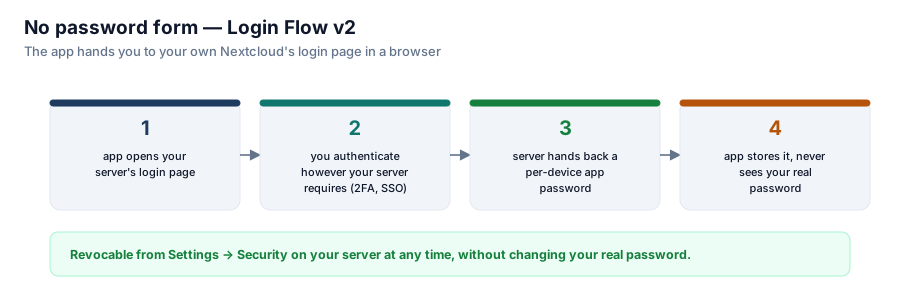
The Android client's onboarding screen asks for one thing: your server's address. There is no username field, no password field, anywhere in the app. That's not a missing feature — it's the entire point of building against Login Flow v2 instead of a form the app itself submits.

Revocable from Settings → Security on your server at any time, without changing your real password.
What actually happens on sign-in
Typing your server's address sends the app into your own Nextcloud's real login page, in a real browser, not a WebView the app controls. Whatever your server requires to authenticate — a password, two-factor, an SSO redirect through some completely different identity provider — happens there, on infrastructure the app never touches and never sees. What comes back to the app afterward is not your password. It's a fresh app password: a credential scoped to that one device, generated by your server specifically for this sign-in.
The README states the reason for the design flatly: "That is not just tidier — it is the only way an app can honour whatever two-factor or single sign-on your server uses." A client-drawn login form has a ceiling on what it can support — it can ask for a username and a password, and that's about it. Handing the whole exchange to the server's own login page removes the ceiling entirely; the app supports every authentication method the server supports, including ones that didn't exist when the app was written, because it was never the one implementing them.
What the app actually holds afterward
An app password is not your account password with extra steps. It's a distinct, independently revocable credential — visible in Settings → Security on the Nextcloud server as its own row, separate from your real login, with its own name and its own "revoke" button. Losing your phone, or simply deciding you no longer trust it, means one click on the server: that one device's access ends, and your actual password never had to change.
That property is also what makes it safe for the client to store the credential at all. A stolen device that yields the app password yields access to exactly the OCS endpoints this app uses, on this one account, until it's revoked — never the account's real password, and never access this app didn't already have.
What this buys the app's threat model
An app that never sees your real password can't leak your real password — not through a bug, not through a compromised dependency, not through a careless log line. The password never enters the process at all. Everything the client subsequently does — encrypting the app password at rest, wiping it from memory when the Keystore is unusable rather than falling back to plaintext — is protecting a credential that was already scoped down to the smallest thing that could possibly leak.
It also means the sign-in flow itself gets to be simple. There's no password confirmation dialog, no "forgot password" link to build, no client-side validation of password rules that differ from server to server. The entire login screen is: type an address, get redirected, come back signed in. Everything harder than that belongs to the server, which already had to solve it for every other client anyway.
Series: Photo Sweep.