
An Encrypted Local Database Backed by the Phone's Secure Hardware
Photo Cleaner's keep/delete decisions live in Room over SQLCipher, keyed by a passphrase that never exists in plaintext on disk — wrapped by a StrongBox-backed Android Keystore key when the device has one.
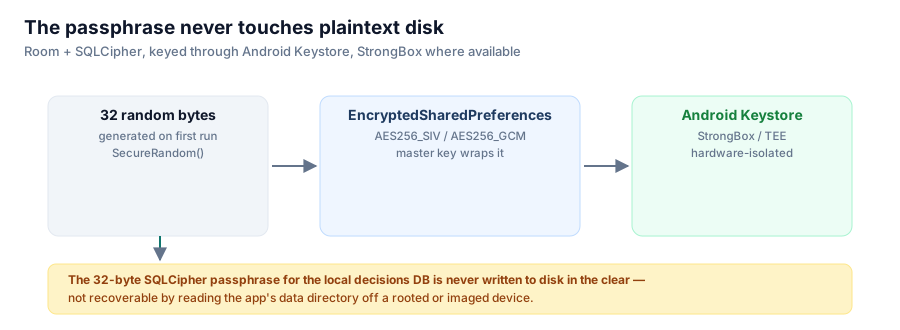
Every swipe decision in this app — keep, delete, undo — is written to a local Room database before anything ever touches your Google account. That database is encrypted at rest with SQLCipher, and getting the encryption key right meant not storing it anywhere a phone's own filesystem could reveal it.

Room + SQLCipher, keyed through Android Keystore, StrongBox where the device provides it.
The naive approach, and why it's wrong
The easy way to key a SQLCipher database is a hardcoded or app-generated passphrase stored in SharedPreferences or a plain file. That's encryption in name only: anyone who can read the app's data directory — a rooted device, a full filesystem image, an ADB backup on an unlocked bootloader — reads the passphrase file right next to the encrypted database and decrypts it trivially. The encryption adds a step, not a barrier.
What DatabaseKeyProvider.kt actually does
The passphrase is 32 random bytes generated once, on first run:
ByteArray(PASSPHRASE_BYTES).also { fresh ->
    SecureRandom().nextBytes(fresh)
    prefs.edit()
        .putString(KEY_DB_PASSPHRASE, Base64.encodeToString(fresh, Base64.NO_WRAP))
        .apply()
}
But prefs here is not plain SharedPreferences — it's EncryptedSharedPreferences, whose own master key is built like this:
val masterKey = MasterKey.Builder(context.applicationContext)
    .setKeyScheme(MasterKey.KeyScheme.AES256_GCM)
    .setRequestStrongBoxBacked(true)
    .build()
setRequestStrongBoxBacked(true) asks Android to generate and hold that master key inside StrongBox — a separate, tamper-resistant hardware security module on devices that have one, distinct from and stronger than the regular TEE-backed Keystore. On devices without a StrongBox chip, Android falls back to the standard hardware-backed Keystore automatically.
The result is a three-layer chain: the 32-byte SQLCipher passphrase is wrapped by EncryptedSharedPreferences, which is wrapped by a Keystore master key that never leaves secure hardware in extractable form. Reading the app's data directory off an imaged device gets you ciphertext at every layer — never the passphrase in the clear.
The failure mode this creates, and how it's handled
Hardware-backed keys have a real downside: they can become permanently unreadable, for instance after a full-device restore onto new hardware where the old key material simply doesn't exist anymore. DatabaseKeyProvider handles that case explicitly rather than crashing:
val prefs = try {
    buildPrefs(context, masterKey)
} catch (e: Exception) {
    context.applicationContext.deleteSharedPreferences(PREFS_FILE)
    buildPrefs(context, masterKey)
}
If the encrypted prefs store is unreadable, it's deleted and rebuilt with a fresh key. That's a deliberate, low-stakes trade-off: the only thing lost is locally cached keep/delete decisions, which the app can regenerate by re-scanning the library. Losing that is annoying, not catastrophic — unlike, say, losing a signing key, which is unrecoverable by design (a topic later in this series).
Why this matters for what the database actually holds
The data being protected here isn't your photos — those never leave Google's servers, this app only ever references them by ID. What's in the local database is your review history: which photos you've already decided to keep or delete, which months are done. That's still worth protecting; it reveals what you were reviewing and what you decided, on a device that could be lost, stolen, or handed off. Hardware-backed encryption for something that modest might look like overkill, but the cost of doing it right — one DatabaseKeyProvider object — is small enough that there's no real reason not to.
Series: Google Photos Cleaner.