
I wanted my phone to buzz without running a mail server, so I picked ntfy
Why ntfy beat Gotify, Pushover, Telegram and e-mail on my single VPS, how its users and tokens live in a .env file, and how alerts still arrive when the VPS is dead.
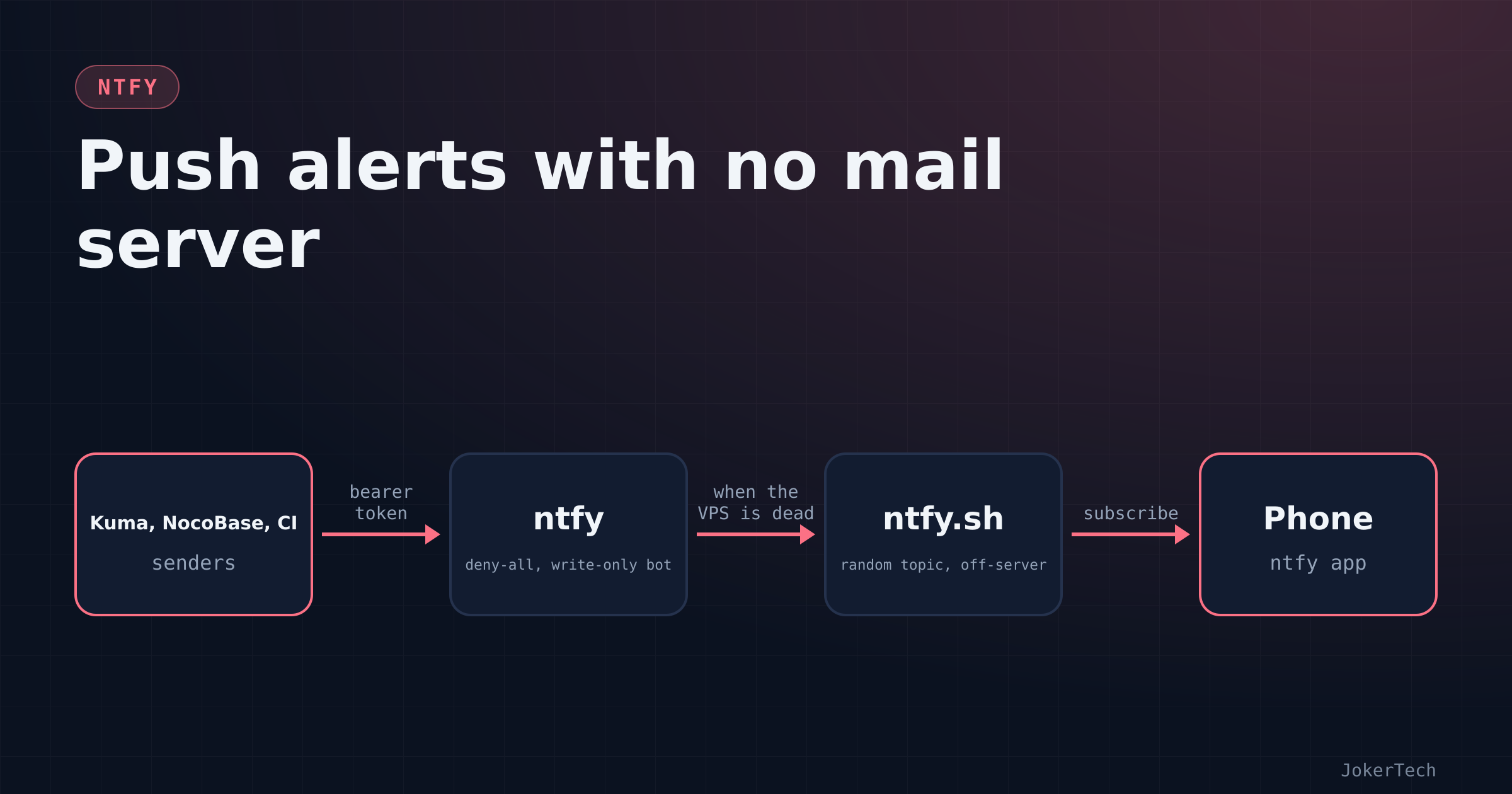
For a long time every alert my server produced went into a bell icon inside a web app that I opened maybe twice a week. NocoBase, which runs most of my personal tracking, had dozens of workflows that dutifully worked out what was overdue, what was expiring and what I'd promised myself to read, and then delivered all of it to an in-app notification list. That's the digital version of shouting into a cupboard.
So in October 2026, while adding a batch of apps to the VPS with an AI assistant doing most of the typing, I asked for a push target. My exact words were "let's implement gotify or ntfy, the one requiring least config and least maintenance". That sentence turned out to be the whole spec.
Three days later ntfy carries alerts from Uptime Kuma, from eleven NocoBase provisioning scripts, from a GitHub Actions workflow, and from Grafana Cloud. A second, private ntfy carries commands to the server. This post is about the first one: why it won, exactly how it's configured, what it's like to live with, and the failure that no notification server on the same box can cover, along with what I did about it.
What I didn't want, and what lost
I'll start with the negative space, because it decided more than any feature list did.
No SMTP. I don't run a mail server and I don't want to. Mail from a small VPS is a deliverability hobby of its own: SPF, DKIM, DMARC, reputation, and the slow discovery that your provider's IP range is on somebody's list. The other apps I added in the same week were partly chosen because they don't need mail. Authelia, for example, writes its 2FA registration codes to data/notification.txt instead of e-mailing them, and I cat the file over SSH like it's 1998. NocoBase does have an e-mail digest wired to Mailgun's HTTP API, which avoids SMTP on my side, but the last time I looked at its environment variables the Mailgun domain still began with CHANGE. That tells you how much I've cared.
No third party holding the message content. The whole point of the exercise was to stop putting someone else's service between my server and my phone.
No clicking. I have a rule for everything on this box: secrets generated by a setup.sh, configuration in git, docker compose up -d, done. A tool that needs a web UI session to create users and tokens after every rebuild is already losing.
No host installs. Everything runs in containers. That one sounds like a minor preference until a tool's setup instructions start with apt install.
As for the alternatives: I didn't run a bake-off. Most of them lost on one of the rules above before anything got installed, and I'd rather say that than pretend I benchmarked them.
Gotify was the only real competitor, because I named it. It's a single Go binary in a container with SQLite, a web UI and an Android app. On "one container, low maintenance" it's a tie. It lost on configuration: Gotify's users, applications and their tokens live in its database and are created through the web UI or the REST API. That's fine for most people. For me it means the auth state of the server is something I'd have to recreate by hand, or script against an API, after any rebuild. ntfy lets me declare it. Gotify also has no official iOS app, which mattered less to me than the config story but would matter to a lot of readers.
Pushover is excellent and cheap, and I didn't seriously consider it. It's a hosted service. Every message passes through it in full.
A Telegram bot is what half the homelab internet uses, and it would have given me two-way chat for free. Same objection, more strongly: message content sits on Telegram's servers, and a bot token is a credential to an account I don't control. I later built a two-way channel myself on a private ntfy, which I'll come back to in another post.
E-mail lost on the SMTP rule, and also on a practical one: I don't read e-mail promptly, and I didn't want my alerts to compete with newsletters.
Uptime Kuma's built-in channels cover dozens of services, so for uptime alone I could have picked any of them. But Kuma wasn't the only sender. NocoBase, scripts and CI needed the same destination, and the common denominator of all of those is "can make an HTTP request".
NocoBase's in-app notifications stayed. They're still there, still useful at a desk. They just aren't a pager.
What tipped it to ntfy were three properties. It can declare users, access rules and tokens in configuration (since some 2.x release there are auth-users, auth-access and auth-tokens, exposed as NTFY_AUTH_USERS, NTFY_AUTH_ACCESS and NTFY_AUTH_TOKENS) and re-applies them at every start. Publishing is plain HTTP: curl -d "message" https://ntfy.example.com/topic with a bearer token, which every sender I have can do. And topics are free: you don't create them, you publish to a name and it exists. That third property is lovely and also got me into a small ACL mess, which has its own post.
The compose file and the setup script
This is the whole service, with my domain swapped for example.com and the timezone line removed:
services:
  ntfy:
    image: binwiederhier/ntfy:latest     # stateless enough to follow latest (see "What it costs")
    container_name: ntfy_app             # other containers reach it as http://ntfy_app
    restart: unless-stopped
    command: serve
    user: "5000:5000"                    # same unprivileged uid as the rest of my stacks
    networks: [frontend]                 # the network Traefik, Kuma and NocoBase share
    environment:
      - NTFY_BASE_URL=https://${NTFY_HOST:-ntfy.example.com}
      - NTFY_UPSTREAM_BASE_URL=https://ntfy.sh        # wakes the iOS app; carries a message ID, not content
      - NTFY_BEHIND_PROXY=true                         # trust X-Forwarded-For from Traefik
      - NTFY_CACHE_FILE=/var/lib/ntfy/cache.db
      - NTFY_CACHE_DURATION=72h                        # phones that were offline catch up within 3 days
      - NTFY_ATTACHMENT_CACHE_DIR=/var/lib/ntfy/attachments
      - NTFY_AUTH_FILE=/var/lib/ntfy/auth.db
      - NTFY_AUTH_DEFAULT_ACCESS=deny-all              # anonymous: no read, no write, no topic discovery
      - NTFY_ENABLE_LOGIN=true                         # lets the web app and phone log in as a user
      # Users, ACLs and tokens are declared in .env and re-applied on every start.
      - NTFY_AUTH_USERS=${NTFY_AUTH_USERS:?}
      - NTFY_AUTH_ACCESS=${NTFY_AUTH_ACCESS:?}
      - NTFY_AUTH_TOKENS=${NTFY_AUTH_TOKENS:?}
    volumes:
      - ./data:/var/lib/ntfy
    healthcheck:
      test: ["CMD-SHELL", "wget -q --tries=1 http://localhost:80/v1/health -O - | grep -Eo '\"healthy\"\\s*:\\s*true' || exit 1"]
      interval: 60s
      timeout: 10s
      retries: 3
      start_period: 40s
    labels:
      - traefik.enable=true
      - traefik.http.routers.ntfy.rule=Host(`${NTFY_HOST:-ntfy.example.com}`)
      - traefik.http.routers.ntfy.entrypoints=websecure
      - traefik.http.routers.ntfy.middlewares=default-security-headers@file,remove_identity@file
      - traefik.http.services.ntfy.loadbalancer.server.port=80
      - traefik.docker.network=frontend

networks:
  frontend:
    external: true
Some lines deserve more than a comment.
NTFY_AUTH_DEFAULT_ACCESS=deny-all is the important one. Without it, anyone who guesses a topic name can read it and publish to it. ntfy's own public instance works that way by design, where the topic name is effectively the password. On a private server that's the wrong default.
The :? on the three auth variables makes Compose refuse to start if any of them is missing or empty. I've seen that refusal in practice while testing an unrelated script, word for word: required variable NTFY_AUTH_USERS is missing a value. Better that than a server that comes up with no users and a policy nobody thought about.
NTFY_UPSTREAM_BASE_URL exists for iPhones. iOS won't let a third-party app keep a socket open in the background, so the ntfy iOS app relies on Apple push, and only ntfy.sh holds the credentials to send those. With an upstream configured, my server forwards a poll request to ntfy.sh carrying a message ID, and the app wakes up and fetches the actual message from my server. The content never leaves the VPS. On Android the app keeps its own connection and you can leave the line out.
The cache duration is a trade-off. ntfy keeps published messages for this long so a phone that was off, or a client using ?since=, can catch up. Three days covers a weekend with the phone in a drawer. It also means three days of alert text sitting in a SQLite file, which I'm fine with on this server.
The healthcheck is upstream's. I mention it because the same session produced an Authelia healthcheck that called a subcommand that doesn't exist in Authelia 4.39 (Error: unknown command "healthcheck" for "authelia"). After that, every healthcheck that had been written got checked against its image. ntfy's survived; Dozzle's didn't.
The Traefik middleware line looks fussy for a reason. My default middleware chain used to include an error-pages middleware that replaced upstream 403, 404, 500 and 503 responses with a generic page. A notification server answers 403 to every unauthenticated request, so that middleware would have turned every auth problem into a confusing stock page and hidden ntfy's JSON error. All my routers moved to the plain security-headers pair for that reason, ntfy included.
The .env is written once, by a script that refuses to run twice:
#!/usr/bin/env bash
# One-time setup: random admin password, random "bot" password, a publisher token.
set -euo pipefail
cd "$(dirname "$0")"
# Never overwrite live credentials by accident.
[ -e .env ] && { echo ".env already exists — delete it first if you really want new credentials"; exit 1; }
mkdir -p data
if [ "$(id -u)" -ne 5000 ]; then sudo chown 5000:5000 data; fi   # the container runs as 5000

rand() { head -c 256 /dev/urandom | tr -dc "$1" | head -c "$2"; }
# Hash with the ntfy image itself: no ntfy binary on the host.
hash() { printf '%s\n%s\n' "$1" "$1" | docker run --rm -i binwiederhier/ntfy user hash 2>/dev/null | tail -n1 | tr -d '\r\n'; }

ADMIN_PW=$(rand 'A-Za-z0-9' 24)
BOT_PW=$(rand 'A-Za-z0-9' 32)          # nobody ever types this one
TOKEN="tk_$(rand 'a-z0-9' 29)"         # same shape as tokens ntfy generates
ADMIN_HASH=$(hash "$ADMIN_PW")
BOT_HASH=$(hash "$BOT_PW")
# Both values must look like bcrypt ($2a$...), or something went wrong with docker.
case "$ADMIN_HASH$BOT_HASH" in *'$2'*'$2'*) ;; *) echo "could not generate bcrypt hashes (is docker usable?)"; exit 1;; esac

umask 077                               # .env readable by its owner only
cat > .env <<ENV
NTFY_HOST=ntfy.example.com
NTFY_AUTH_USERS='admin:${ADMIN_HASH}:admin,bot:${BOT_HASH}:user'
NTFY_AUTH_ACCESS='bot:*:wo'
NTFY_AUTH_TOKENS='bot:${TOKEN}:publisher'
ENV
echo "admin password : $ADMIN_PW"
echo "publisher token: $TOKEN"
echo "Now: docker compose up -d"
Two details took more thought than the rest of the file.
The hash. ntfy user hash is the supported way to produce the bcrypt string, and it prompts for a password and a confirmation. Would it accept them on a pipe or insist on a terminal? Instead of trying it on the server and seeing, the assistant read ntfy's source. ReadPassword checks whether stdin is a character device and only takes the no-echo terminal path in that case; otherwise it reads lines normally, "useful for testing", as the comment in the code puts it. So printf 'pw\npw\n' | docker run --rm -i ... user hash works, and I don't need ntfy installed on the host. The case line afterwards is a cheap guard: if docker isn't usable, the hash function returns an empty string or an error message, and I'd rather stop than write a broken .env.
The quotes. A bcrypt hash looks like $2a$10$.... Docker Compose interpolates variables in .env values, so an unquoted hash loses its $2a and $10 and you end up with a user whose password can never match. Single quotes around the whole value stop that. The .env.example in the repo says it in capitals ("KEEP THE SINGLE QUOTES — compose would eat the $ in the bcrypt hash") because I know who'll edit that file by hand at midnight.
The script prints the admin password and the token once. Both go straight into my password manager. Nothing else ever displays them.
Users, first start and the phone
There are three users on the public server today:
| User | Role | Access | Used by |
admin | admin | everything | me, in the phone app |
bot | user | * write-only | Uptime Kuma, NocoBase, Grafana Cloud's first contact point |
github | user | updates write-only | a GitHub Actions workflow |
Write-only is the property I lean on most. Anything holding the bot token can push messages but can't subscribe to anything. If NocoBase ever leaked its environment variables, the worst outcome is spam on my phone. The github user is narrower still, because its token sits on infrastructure I don't control; how it got there, and why it needed a Cloudflare workaround, is a separate story.
The phone logging in as admin is lazy and I know it. A dedicated read-only user is a one-line change in .env and I haven't made it. The admin password lives only in the app and the password manager, and "minimal maintenance" includes not inventing work. It's still on the list.
With that in place, the whole deployment on the server is:
cd /srv/docker/ntfy
./setup.sh
docker compose up -d
docker compose ps        # wait for (healthy), about 40 s with this start_period
Then two checks from anywhere. With the token, a publish should return JSON describing the message:
curl -H "Authorization: Bearer tk_..." -d "hello" https://ntfy.example.com/testWithout it, the same request should be refused with a 403. That second test matters as much as the first; a 200 there means deny-all didn't apply and your topics are public. The healthy state of the healthcheck itself is visible from outside too:
curl -s https://ntfy.example.com/v1/health
{"healthy":true}
That endpoint is public on purpose. It comes back later.
The ntfy app is the client. Settings, add the server https://ntfy.example.com, log in as admin. Then for each topic: tap plus, choose "use another server", pick mine, type the topic name, subscribe. Each topic becomes its own subscription with its own notification settings, which is the feature I use most. Noisy topics get muted without touching any sender.
As of mid-October 2026 I'm subscribed on my own server to uptime, due, calendar, today, weather, books, updates, general and monitor, plus one long random topic on ntfy.sh that I'll explain in a moment. The same app also holds the private ChatOps server, which is reachable only over Tailscale. Having both in one list caused real confusion within two days, in both directions: I tried to subscribe to the due topic on the private server, and later sent a ChatOps command to a topic on the public one. Neither produced an error. They just produced silence, which is the worst kind of feedback a notification system can give. The READMEs now say in bold which server each topic lives on, and the dashboard lists the two ntfy servers as separate entries.
Priorities do real work on the phone. Senders use 3 for routine, 4 when something is overdue or a monitor is down, and 5 only for a critical server alert or an extreme weather warning. On Android the app gives each priority its own notification channel, so 5 can be allowed through do-not-disturb (the monitoring README suggests exactly that for the fallback topic) while the rest stays quiet at night.
The alert ntfy can never send
Right at the start, before ntfy existed on the box, I asked the question that every single-server setup has to answer eventually: "what happens when the server itself is down or off?"
Uptime Kuma runs on the VPS. ntfy runs on the VPS. If the VPS dies, the thing that notices and the thing that tells me are both dead, and my phone stays quiet, which looks exactly like everything being fine.
At one point I asked whether to move Kuma and ntfy to a free Google Cloud instance. The answer was no, and I agree with it: a second VM is a second thing to patch, which defeats the point of "minimal maintenance". The first answer was UptimeRobot's free tier, watching from outside. The plan in the Kuma README is a keyword monitor on ntfy's public health endpoint:
URL:     https://ntfy.example.com/v1/health
Keyword: "healthy":true
If the origin is down, Cloudflare answers with a 52x and the keyword isn't there. That alert has to go by e-mail or the UptimeRobot app, not through ntfy, because ntfy is the thing that's down. UptimeRobot already watches the stack; moving it to this keyword monitor is still an open housekeeping item in my tracker as I write.
The second answer came two days later, when the VPS started freezing hard enough that SSH stopped responding. That led to off-server monitoring on Grafana Cloud's free tier, which belongs to another post. The ntfy side of it is worth describing here, because it's the design I'd recommend to anyone with a notifier on the same box as everything else: every alert goes to two ntfy destinations.
The first is my own server, topic monitor, published with the same bot token. Nice formatting, my auth, my retention. It works whenever the server is healthy enough to matter.
The second is the public ntfy.sh, with a long random topic and no token at all:
echo "srv-alerts-$(openssl rand -hex 8)"On ntfy.sh there's no auth for anonymous topics; the name is the secret. So it has to be unguessable, and it never goes into git. A "host stopped reporting" rule evaluated in Grafana Cloud fires when the VPS goes silent, and that alert reaches my phone through ntfy.sh, because the other path is frozen along with everything else.
On the Grafana side both are webhook integrations on one contact point, posting JSON to the server root with the topic in the body. The template is pasted into the contact point:
{
  "topic": "monitor",
  "title": "{{ if eq .Status "firing" }}FIRING{{ else }}RESOLVED{{ end }}: {{ .CommonLabels.alertname }}",
  "message": "{{ range .Alerts }}{{ .Annotations.summary }}  {{ end }}",
  "priority": {{ if eq .Status "resolved" }}3{{ else if eq .CommonLabels.severity "critical" }}5{{ else }}4{{ end }},
  "tags": ["{{ if eq .Status "firing" }}rotating_light{{ else }}white_check_mark{{ end }}"]
}
The README's troubleshooting line for that integration is one of the most useful two sentences in the repo: a 401 from ntfy means wrong token or ACL, a 400 means the template produced invalid JSON, usually because an alert summary contained a double quote or a line break that got pasted raw into a JSON string. The alert summaries are written to avoid both.
The first real alert through that chain arrived on 16 October: a security rule matching a scanner that had made a couple of hundred requests for .env, .git and wp-login in ten minutes. That's when the "dual path" stopped being a diagram. I haven't yet had the server freeze since the ntfy.sh path went in, so the path that exists for exactly that case is configured and tested with Grafana's Test button, not proven by a real outage.
One detail from the UptimeRobot notes I'd underline for anyone copying any of this: public status pages show monitor names. Name them "Server" and "Web", not one per service, unless you enjoy publishing your inventory.
Living with it
Mostly, I don't think about ntfy, which is the compliment. The messages I actually see in a normal week:
- an 08:00 brief on
todayand, when something is due, an 08:10 list ondue - event reminders and a morning agenda on
calendar - Kuma's down and up pairs on
uptime, which in the first days were as often a badly configured monitor as a real outage - "PR opened" on
updateswhen Renovate wakes up on Monday - a reading nudge on
bookswhen a book has stalled for a few days
Adding a new kind of alert takes no change on the ntfy server, because the bot token can write to any topic. I subscribe on the phone and the sender publishes. On the NocoBase side eleven provisioning scripts publish to ntfy now, all but one over the internal Docker network to http://ntfy_app/ so they don't go out through Cloudflare and back in. The odd one out is the oldest, the reading reminder, which still uses the public URL because nobody has rebuilt it.
What it costs: close to nothing so far. The image follows latest, which my update policy allows for stateless apps that migrate themselves; NocoBase, Kavita and anything with a schema get pinned. When I listed what was running in mid-October, ntfy reported version 2.30.0. Its state is two SQLite files: the auth database, which is regenerated from .env at every start anyway, and the 72-hour message cache. Backups matter for the .env and nothing else. Losing the cache loses three days of history, which I can live with.
The scripts that edit .env later (for the GitHub user, for instance) copy it to .env.bak.<timestamp> first. Those backups accumulate. I delete them now and then.
Loose ends, and what I'd change
Being honest about the loose ends, as of 17 October 2026:
- the phone still logs in as
admin; a read-only user would be better - the UptimeRobot keyword monitor on
/v1/healthis a housekeeping item, not done ntfy/.env.examplestill shows an older, narrower access line thansetup.shwrites, a leftover from a design that moved elsewhere- the reading reminder still publishes through the public URL
- the ntfy.sh fallback has passed its test button, not a real freeze
- the e-mail digest's Mailgun settings are placeholders, and I'm not in a hurry
If I started again, I'd write the topic plan before the first workflow published anything. Topics being free is lovely until you have to remember which service writes to which name, on which of your two servers, and what the access rules say about it. The README has a table now; it should have been the first file.
I'd create the read-only phone user on day one, when it costs nothing.
And I'd have set up the off-server path immediately rather than after the first freeze. "What happens when the server is down" was literally my first question. The honest answer for three days was "you find out when you try to open something", which is the situation I'd set out to fix.