
There Is No Official Delete API for Google Photos
The Photos Library API never had a delete endpoint, and on March 31, 2025 Google revoked the read-library scopes too — closing the loop entirely.
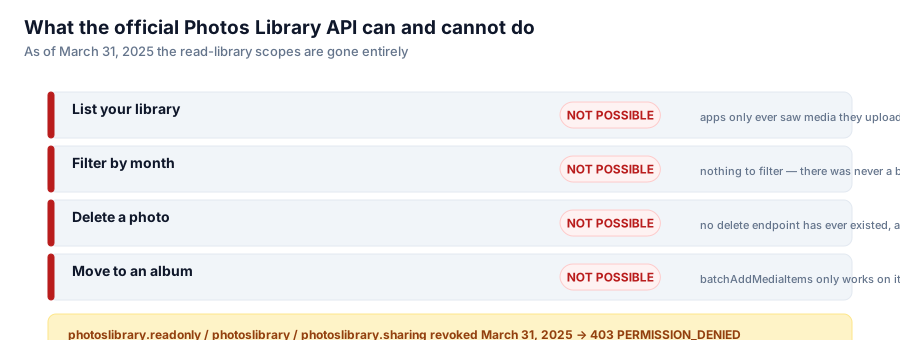
I wanted to write an app that lets you swipe through your Google Photos library one photo at a time and delete the ones you don't want. The first thing I learned is that the "obvious" approach — call Google's own Photos Library API — cannot do this job, and never could.

Four things a cleanup app needs. The official API has never offered any of them.
What the API never had
Go read the Photos Library API reference and you will not find a delete endpoint, at any version, at any date. It was never offered. batchAddMediaItems can add an item to an album, but only for items your own app uploaded — it cannot touch anything the user already has in their library. There is no batchRemoveMediaItems that removes a photo from the account, only batchRemoveMediaItems scoped to albums your app created.
That already rules out the core feature. But it gets narrower.
What March 31, 2025 removed
On March 31, 2025, Google removed the photoslibrary.readonly, photoslibrary, and photoslibrary.sharing OAuth scopes outright. Any call that used to work with those scopes now returns:
403 PERMISSION_DENIEDBefore that date, an app could at least list items it had access to. After it, the only thing third-party apps can do with the Library API is see media they created themselves — the read-your-existing-library door is closed.
The replacement doesn't fill the gap
Google's answer to the backlash was the Picker API: a UI you launch that lets the user manually select photos in Google's own picker, one session at a time. It returns exactly four fields per item — id, createTime, type, and mediaFile. No productUrl, nothing to browse by month, nothing to paginate over the whole library.
That is fine for "attach a photo to this form." It is useless for "let me review 40,000 photos in date order and decide what to keep," which is the entire premise of a cleanup tool. You cannot build a browsing UI on an API that gives you nothing to browse.
So what's left
| What you need | Official API |
| List your library | Not possible — apps only see media they created themselves |
| Filter by month | Not possible — there is nothing to filter |
| Delete a photo | Never existed. No delete endpoint has ever been offered |
| Move a photo to an album | batchAddMediaItems only works on items your app uploaded |
Every row is a hard no, not a workaround-with-effort. This is the reason Google Photos cleanup tools — mine included — don't call the official API at all. They drive the same internal batchexecute RPC endpoint that photos.google.com itself uses in the browser: the private API behind the web front-end, not the public one Google publishes for developers.
That's a deliberate, documented choice with its own trade-offs (undocumented endpoints, terms-of-service risk, the possibility Google changes the shape of a response without notice), and it's the subject of the next post in this series. But the starting condition is worth stating plainly: this isn't a case of an app taking a shortcut around an inconvenient but usable API. There was no usable API to begin with, and as of last year, Google made sure of it.
Series: Google Photos Cleaner.