
The Bad Gateway that was really Gogs saying no
Adding a GitHub mirror to Gogs kept failing with Bad Gateway. It took an hour, an SSH-key detour and a Traefik access log to find a plain 403 underneath.
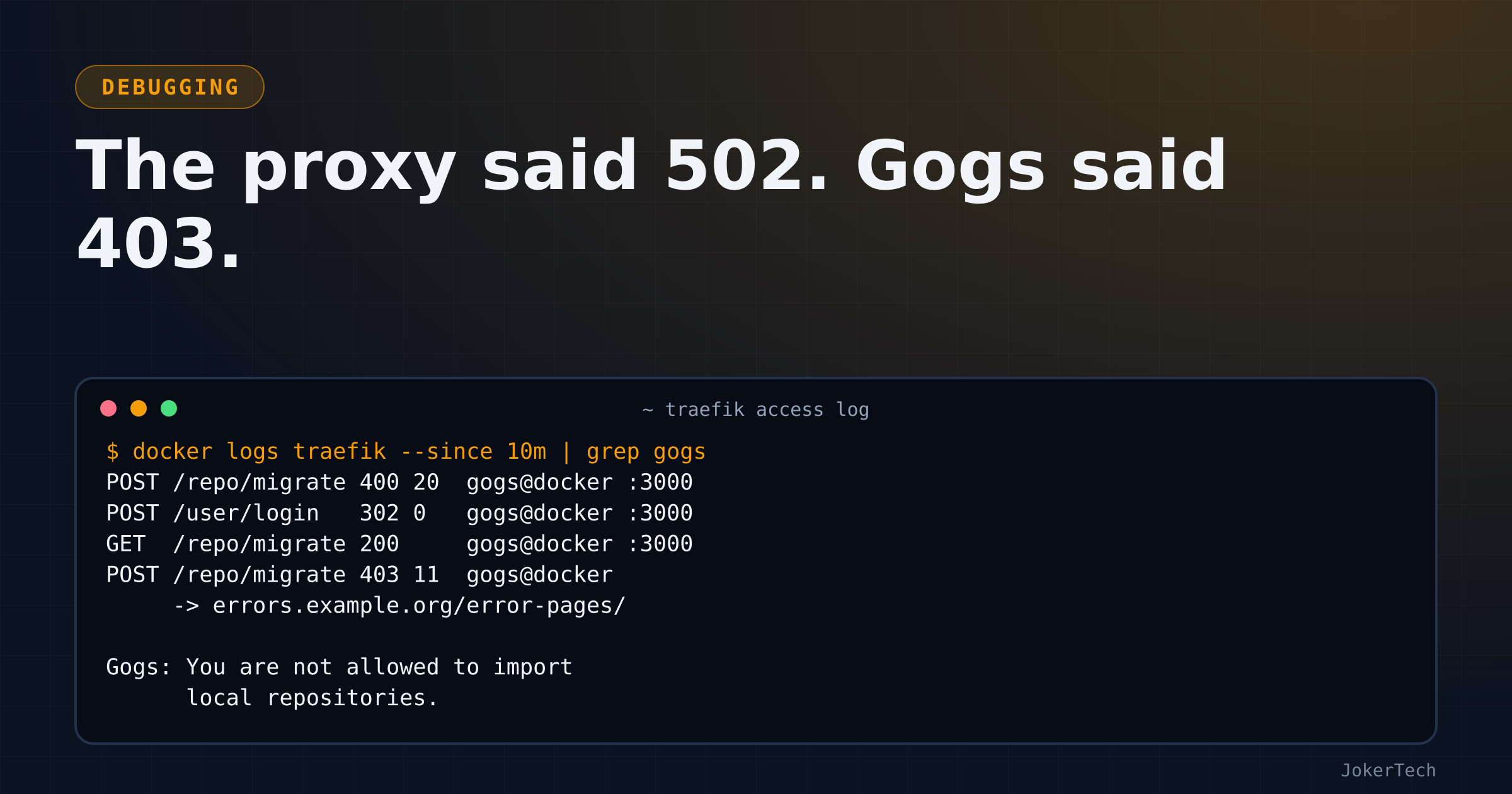
The page said "Bad Gateway". Eleven bytes, white background, nothing else. I had clicked Migrate on the Gogs "New migration" form, ticked the box that makes the new repository a mirror, and pasted the clone address of one of my GitHub repos. The SSH one, [email protected]:owner/repo.git, because that is what my fingers copy out of habit.
A 502 means the proxy couldn't get a good answer from the thing behind it. So I spent the next hour treating Gogs as broken: crashing, unreachable, misconfigured, something. It was none of those. Gogs answered every single request quickly and correctly, and for the migrate button it answered with a 403 and a perfectly readable error message. Something between Gogs and my browser was eating that message and putting a lie in its place.
This is the full story of that hour, including the part where I went confidently in the wrong direction for a good while. I was working through it with an AI coding assistant in my terminal, pasting output from the server back and forth, and I'll be honest about which wrong turns were mine and which were suggested to me, because the interesting thing is that neither of us looked at the obvious clue until late.
What I was trying to do
The idea was modest. I keep my code on GitHub. I wanted a second, live copy of some of it on my own VPS, so that if GitHub locked me out, lost something or became unpleasant, I'd still have every branch and the history in a place I control. Gogs, which I already run, has pull mirrors: you give it a remote URL once, and it fetches on a timer from then on. No CI, no webhooks, nothing on the GitHub side. That's exactly the shape of thing I like, because it has no moving parts I have to babysit.
There are other ways to get a second copy, and I'll come back to them at the end. For now, the plan was "paste URL, tick mirror, done".
The setup
Gogs runs in Docker on the VPS. Traefik terminates TLS in front of it, and Cloudflare proxies the DNS record in front of Traefik. This is the compose file as it was that afternoon, sanitised and annotated:
services:
  gogs:
    image: gogs/gogs:latest        # was running 0.14.3 at the time
    container_name: gogs_app
    restart: unless-stopped
    networks: [frontend]           # the shared network Traefik watches
    volumes:
      - ./data:/data               # repos, SQLite DB, config, logs: everything
    # ports:
    #   - "10022:22"               # SSH deliberately not published (Cloudflare can't proxy it)
    labels:
      - traefik.enable=true
      - traefik.http.routers.gogs.rule=Host(`git.example.com`)
      - traefik.http.routers.gogs.entrypoints=websecure
      - traefik.http.routers.gogs.middlewares=default@file   # <- remember this one
      - traefik.http.services.gogs.loadbalancer.server.port=3000
      - traefik.docker.network=frontend

networks:
  frontend:
    external: true
The default@file line is the whole story. It points at a middleware chain defined in Traefik's own dynamic configuration files, not in this repo, and every app in my stack used it. I didn't look at what was in it for about forty minutes.
Wrong turn one: "SSH needs a key"
The first theory was reasonable on its face, and I'd have come up with it myself. Gogs creates a mirror by running git clone --mirror inside its container. An SSH clone address needs a private key the remote accepts and a known_hosts entry for GitHub's host key. A fresh gogs/gogs container has neither. So the clone fails or hangs, the request to Gogs takes too long or errors, and Traefik reports the failure as a 502. Plausible enough that I didn't question it.
The recommendation at that moment was actually the right one: use the HTTPS address. SSH was the problem. But it came with the wrong reason attached, so when I didn't immediately switch (I wanted to understand), we went off and tried to make SSH work.
That meant looking at the server, and the first listing I pasted didn't match my compose file at all:
$ ls -al /srv/docker/gogs/config
drwxr-xr-x 2 root  root  4096 .ssh
-rw-r--r-- 1 app   app    952 app.ini
drwxr-xr-x 2 app   app   4096 conf
drwxr-xr-x 3 app   app   4096 data
drwxr-xr-x 2 app   app   4096 log
There's no config directory in the compose file in git. So, rather than guess, ask Docker:
docker inspect gogs_app --format '{{json .Mounts}}'[{"Type":"bind","Source":"/srv/docker/gogs/config","Destination":"/data/gogs","Mode":"rw","RW":true},
{"Type":"volume","Name":"<backup-volume>","Destination":"/backup","RW":true},
{"Type":"bind","Source":"/srv/docker/gogs/data","Destination":"/data","Mode":"rw","RW":true}]Two bind mounts, one nested inside the other, plus a backup volume. The compose file on the server had been edited by hand at some point and never committed back. That rabbit hole gets its own post, because it caused a separate round of confusion about which app.ini Gogs reads. For the mirror, the relevant conclusion was that the root-owned .ssh in config/ was not where ssh would look. The container's git user has its home at /data/git, so a key would have to go in /data/git/.ssh.
The suggested fix was to generate the key inside the container, as the right user, so nobody has to work out which host UID maps to the container's git user:
docker exec gogs_app sh -c 'getent passwd git; id git'   # confirm home dir and uid first

docker exec -u git gogs_app sh -c '
  mkdir -p ~/.ssh && chmod 700 ~/.ssh &&
  ssh-keygen -t ed25519 -N "" -f ~/.ssh/id_ed25519_github -C gogs-mirror &&
  ssh-keyscan github.com >> ~/.ssh/known_hosts &&
  printf "Host github.com\n  IdentityFile ~/.ssh/id_ed25519_github\n  IdentitiesOnly yes\n" >> ~/.ssh/config &&
  chmod 600 ~/.ssh/config ~/.ssh/id_ed25519_github &&
  cat ~/.ssh/id_ed25519_github.pub'
Then add the printed public key on GitHub as a read-only deploy key on that repository, test with docker exec -u git gogs_app ssh -T [email protected], retry the migration.
The -u git trick is worth keeping in your pocket: running a command inside the container as the service user gets file ownership right without any chown guesswork on the host. As for the rest of this section, it was wasted effort. Hold that thought.
Wrong turn two: a CSRF error and a config file nobody reads
The next attempt gave a different message: "invalid CSRF token". That one I half expected. The container had been recreated while I had a logged-in tab open in the browser, so my session no longer matched anything the server knew. Logging in again cleared it. The Traefik access log, which I'd only look at properly later, recorded the sequence exactly: two POST /repo/migrate requests answered with 400, then a POST /user/login answered with 302, and from then on the migrate POSTs returned something else. A CSRF failure in Gogs is a 400, so whatever came after was past the CSRF check.
While on the CSRF theory, the suggestion was to check [server] in app.ini, because a mismatch between the URL Gogs thinks it lives at and the URL the browser uses is a classic cause of cookie and CSRF trouble behind a proxy. I printed the file I believed Gogs used. It set EXTERNAL_URL rather than the older ROOT_URL, which only matters on old versions, so:
$ docker exec gogs_app /app/gogs/gogs --version
Gogs version 0.14.3
0.14 reads EXTERNAL_URL. Fine. The more important discovery was that the file I'd printed was invisible to the container, because the nested config mount sat on top of it. I took the config mount out, and recreated the container. Recreate, not restart: docker restart keeps the existing mounts, so a compose change does nothing until docker compose up -d --force-recreate.
And then the page went back to saying Bad Gateway.
Proving Gogs was alive
At this point a 502 had a fair chance of being genuine. I'd just recreated the container, maybe it was crash-looping on a bad config. So I checked in order, from the inside out.
Is it running?
$ docker ps -a --filter name=gogs_app
CONTAINER ID   IMAGE              STATUS                    PORTS              NAMES
5c33fab6f190   gogs/gogs:latest   Up 52 seconds (healthy)   22/tcp, 3000/tcp   gogs_app
What does it log?
$ docker logs gogs_app --tail 50
usermod: no changes
syslogd started: BusyBox v1.37.0
unknown key type dsa
Unable to load host key: /data/ssh/ssh_host_dsa_key
sshd[26]: Server listening on :: port 22.
[TRACE] Log mode: File (Info)
The DSA complaint looks scary and isn't. It's the image's bundled sshd trying a key type that modern OpenSSH dropped. Nothing else of interest, because Gogs logs to a file, not to stdout.
Does Gogs itself answer on its port, from inside the container?
$ docker exec gogs_app wget -qO- http://localhost:3000 | head -4
<!DOCTYPE html>
<html>
<head data-suburl="">
     <meta http-equiv="Content-Type" content="text/html; charset=UTF-8" />
Yes. Is it on the network Traefik uses, with the labels Traefik expects?
docker inspect gogs_app --format '{{json .NetworkSettings.Networks}}' | grep -o '"[a-z_-]*":{'
# "frontend":{

docker inspect gogs_app --format '{{json .Config.Labels}}'
# ... "traefik.docker.network":"frontend", "traefik.http.routers.gogs.middlewares":"default@file",
#     "traefik.http.routers.gogs.rule":"Host(`git.example.com`)", ...port":"3000"
Yes. And does Traefik serve the site if I take Cloudflare out of the path? curl --resolve pins the hostname to the server's own IP, so the request goes straight to Traefik with the right SNI and Host header:
curl -sk -o /dev/null -w '%{http_code}\n' \
  --resolve git.example.com:443:203.0.113.10 https://git.example.com/
200- Routing fine, container fine, Cloudflare not involved. Only the migrate button failed. That should have been the moment to stop theorising and look at the one request that failed. It took one more detour.
A small aside on that detour: my first grep of the Traefik log was grep -i -E 'gogs|error|502', and it returned a screenful of lines from a completely different app, because a bot was hammering it with absurdly nested login redirect URLs and some of the percent-encoded noise happened to contain 502. Grepping for a status code as a bare number in an access log is a bad idea. Grep for the router name instead.
The access log knew all along
The breakthrough was boring. Filter Traefik's access log to the Gogs router and read the columns.
docker logs $(docker ps --filter name=traefik -q | head -1) --since 10m 2>&1 \
  | grep 'gogs@docker'
ERR Router uses a nonexistent certificate resolver certificateResolver=le-prod routerName=gogs@docker
"POST /repo/migrate HTTP/2.0" 400 20 "-" "-" 962498 "gogs@docker" "http://10.0.0.5:3000" 4ms
"POST /repo/migrate HTTP/2.0" 400 20 "-" "-" 962511 "gogs@docker" "http://10.0.0.5:3000" 3ms
"GET / HTTP/2.0" 302 34 "-" "-" 962521 "gogs@docker" "http://10.0.0.5:3000" 2ms
"GET /user/login HTTP/2.0" 200 7424 "-" "-" 962522 "gogs@docker" "http://10.0.0.5:3000" 21ms
"POST /user/login HTTP/2.0" 302 0 "-" "-" 962531 "gogs@docker" "http://10.0.0.5:3000" 10ms
"GET /repo/migrate?mirror=1 HTTP/2.0" 200 11722 "-" "-" 962548 "gogs@docker" "http://10.0.0.5:3000" 19ms
"POST /repo/migrate HTTP/2.0" 403 11 "-" "-" 962568 "gogs@docker" "https://errors.example.org/error-pages/" 538msRead the last line slowly. Status 403. Body 11 bytes, which is the length of the string "Bad Gateway". And the backend column, which for every other request is the Gogs container on port 3000, is suddenly an external URL for an error-pages service. Also note the timing: 538 ms, where every request served by Gogs took a few milliseconds. That extra half-second was Traefik going off to fetch a replacement page.
That's Traefik's errors middleware. When the upstream returns a status in its configured range, it throws away the upstream's response body and fetches a replacement page from a configured service instead. In my config, that service pointed at an external site's error pages, a URL that had been copied in from some other config long ago and had never worked from this box. The fetch failed, so the browser got neither the pretty replacement page nor Gogs's real message. It got "Bad Gateway", in 11 bytes, with a 403 status code. I had in fact sent a screenshot of the browser's network tab a few minutes earlier, and it showed exactly that: 403, 11 B. Neither of us had made anything of it yet.
(The certificate resolver error at the top is a separate leftover in the Traefik config. It didn't stop this router from serving pages, I haven't dug into why, and it's on the list for another day.)
The default middleware turned out to be a chain:
http:
  middlewares:
    default:
      chain:
        middlewares:
          - default-security-headers   # HSTS, nosniff, frame-deny and friends
          - remove_identity            # strips server identification headers
          - error-pages                # replaces 4xx/5xx bodies with a fetched page
Even with the log line in front of us, there was one more wrong guess. Since both the SSH and the HTTPS address attempts (I'd tried one by then) failed the same way, and Gogs's own log showed nothing at all for either, the next theory was a web application firewall plugin in the middleware chain rejecting any form that contained a URL. It was a decent hypothesis given the evidence, and the chain above disproved it in one read: headers middlewares only add or remove headers, they can't reject a request. The 403 came from Gogs. error-pages was hiding it.
The alternative test, which I didn't need in the end, would have been to bypass Traefik entirely: publish port 3000 on the server's loopback interface only, open an SSH tunnel from the laptop, and submit the form at http://localhost:3000. That's a good general technique for "is it the proxy or the app?" and it would have answered the question too. Taking one middleware out was faster:
- traefik.http.routers.gogs.middlewares=default-security-headers@file,remove_identity@filedocker compose up -d, submit the form again, and there it was, rendered by Gogs in a red box above the form:
You are not allowed to import local repositories.
Why Gogs calls an SSH address a local path
Once you have the message, the source code makes it obvious. This is ParseRemoteAddr in internal/form/repo.go, trimmed a little:
remoteAddr := strings.TrimSpace(options.CloneAddr)

// Remote address can be HTTP/HTTPS/Git URL or local path.
if strings.HasPrefix(remoteAddr, "http://") ||
    strings.HasPrefix(remoteAddr, "https://") ||
    strings.HasPrefix(remoteAddr, "git://") {
    u, err := url.Parse(remoteAddr)
    // ... reject hostnames that resolve to blocked local networks ...
    // ... attach the username/password from the form to the URL ...
    remoteAddr = u.String()
} else if !options.User.CanImportLocal() {
    return "", database.ErrInvalidCloneAddr{IsPermissionDenied: true}
} else if !osx.IsDir(remoteAddr) {
    return "", database.ErrInvalidCloneAddr{IsInvalidPath: true}
}
Anything that doesn't start with one of those three schemes is treated as a path on the server's disk. [email protected]:owner/repo.git has no ://, so as far as Gogs is concerned it's a local path. CanImportLocal() returns true only if ENABLE_LOCAL_PATH_MIGRATION is on in the config and the user is an admin or has the per-user "may import local repositories" flag. My user had none of that, so the function returns IsPermissionDenied, and the route handler renders it like this:
case addrErr.IsPermissionDenied:
    c.RenderWithErr(c.Tr("repo.migrate.permission_denied"), http.StatusForbidden, MIGRATE, &f)
A form re-rendered with an error message and a real 403 status. Which is exactly the status range the errors middleware was configured to swallow. If I'd been an admin with local imports enabled, I'd have got "Invalid local path, it does not exist or not a directory" instead, with a 400. Either way, no SSH.
The form even tells you, in grey text under the clone address field: "This can be a HTTP/HTTPS/GIT URL." I'd read straight past it.
So the SSH key exercise was pointless from the start. Gogs never got as far as running git; it rejected the string before any clone was attempted. And there had been evidence of that all along. The Gogs log file (in /app/gogs/log/gogs.log inside this image, per the [log] section of app.ini) contained startup lines and nothing else:
[ INFO] Gogs 0.14.3
[ INFO] Run mode: Production
[ INFO] Available on https://git.example.com/
A failed clone would have logged a git error. An empty log, after several "failed" migrations, meant nothing had been attempted. I saw that and didn't weigh it properly, and neither did the assistant, who did eventually say it plainly: "I told you SSH mirroring could work with a key, and I was probably wrong." Then, once the message was on screen, an apology for the detour. I'll take it. I'd have made the same mistake on my own.
Cleanup took a minute: delete the key from /data/git/.ssh inside the container, delete the deploy key on GitHub. A leftover key with read access to a repo is precisely the kind of cruft that outlives anyone's memory of why it's there.
What works
The HTTPS address. For a public repo that's all you need. For a private one, expand "Need authorization" on the form and enter any username plus a GitHub personal access token as the password. The narrowest token that works is a fine-grained one restricted to that single repository with read-only access to its contents. A mirror only ever fetches.
One consequence to be aware of: in the code above, Gogs folds the username and password into the remote URL it stores. So that token lives on the server, in the mirror's configuration, for as long as the mirror exists. That's the main reason I'd keep it read-only and per-repository, even if it means more tokens to track.
I should be straight about one thing: the working session ended with the real error on screen and the fix explained, not with me pasting a screenshot of a successful mirror. HTTPS is what the form asked for from the start, and it's what I paste now.
After creation, Gogs re-syncs each mirror on a timer. In the source I have, [mirror] DEFAULT_INTERVAL is 8 hours, and each mirror's settings page lets you change its interval. [git.timeout] MIRROR defaults to 300 seconds per sync. My repos are small and I haven't come near that. For a big first import, the thing I'd worry about is the migrate request itself, which travels through Cloudflare and Traefik and won't wait forever.
Day to day
Adding a mirror now takes thirty seconds: New migration, paste the HTTPS address, token if private, tick mirror, done. That form annoyed me enough (paste URL, then type the repo name by hand) that I sent a small patch upstream to fill the name in automatically, which is its own post.
What I don't have yet is any alerting on mirror failures. If a token expires, the mirror's sync will start failing on its schedule, and I'm not aware of anything that would tell me apart from the admin panel's system notices. I haven't tested what that looks like. It's on the list, probably as a check from the uptime monitor against the mirror's last-updated time, if I can find a clean way to read it.
The real fix was in Traefik
Removing error-pages from one router was the diagnosis. The day after, I took it off every router in the stack: sixteen of them moved from default@file to the two-middleware list in one commit. Any app returning a 403, 404, 500 or 503 had been showing the same useless page, and I'd simply never noticed, because most apps don't rely on error statuses for their own messages the way Gogs's forms do.
I considered the other fix, which is to point error-pages at an error page service that actually works on my box. I decided against it. Custom error pages are a nice touch for a public website, where a visitor might land on a 404. For self-hosted apps they're actively harmful, because the app's own error response usually carries the one piece of information you need, and replacing it with a generic page throws that away. A broken replacement is the worst case. A working one is still a downgrade.
There's a smaller lesson in the compose file too. The quick fix applied on the server that afternoon was to append a second middlewares label rather than edit the first. With list-style labels, the later one won, so it worked, but the file then contained two contradictory lines for a day until the cleanup commit removed the stale one. Not dangerous, just the sort of thing that makes the next reader (me, a week later) read the wrong line first.
Other ways I could have done this
For completeness, here's what else would have given me a second live copy of my GitHub repos, and why I'm still using Gogs mirrors for this.
A GitHub Actions workflow that pushes to the second host on every push. I do exactly that for GitLab. It updates within seconds, but it means a workflow file and a secret in every repo, and a credential with push rights stored on GitHub. For a copy on my own box, I'd rather the box pull with a read-only token than have GitHub push into it.
A cron job on the VPS running git fetch against bare mirror clones. Simplest of all, and no web UI. Gogs gives me the UI and the scheduling for free, and it's already running.
Gitea or Forgejo, which also do pull mirrors (and push mirrors). I didn't try them for this. I already had Gogs, and switching git servers to fix a problem that turned out to be a proxy middleware would have been silly.
What I'd do differently
When a reverse proxy says 502, read the proxy's access log line for that exact request before forming any theory. The status it got from upstream, the backend it actually used and the response time are all in one line. I had that log the whole time.
Believe the browser's network tab. Mine showed "403" next to the request, which is not a gateway error by any definition, and I looked at it without letting it change my theory.
Read the form. The hint under the field said which URL schemes are accepted.
And treat silence in an application's log as evidence. If the app didn't log anything about the operation that failed, the operation probably never ran.