
My chat bot is root on the host, on purpose: the nsenter listener
How a no-host-installs rule pushed my ChatOps listener into a privileged container that runs docker, git and apt in the host's namespaces through nsenter, why mounting the Docker socket wasn't enough, and how I reasoned about the risk.
The docstring at the top of my ChatOps listener still says this:
Standard library only; runs on the host (not in a container: compose bind mounts need host paths).It has been wrong for two days, and I've left it long enough that it has become a small monument. That sentence was the reason the first three versions of ChatOps were a systemd service. It's also the reason the fourth version is a privileged container that enters the host's namespaces, which is the least comfortable decision in the whole design. This post is about how I got there, what the code looks like, the alternatives that lost, and why I kept it.
The rule
On this VPS, Docker is the only thing I install on the host. Every app, every helper, every loop that would once have been a cron job is a container in a compose project in one git repo. The reasons are the usual ones. A host package has its own update channel and its own config files in places I forget. A container is described in a file I can read, diff and roll back. When I rebuild the server one day, git clone plus docker compose up -d per folder should be the whole job.
The first ChatOps design ignored the rule because it seemed unavoidable. The listener's whole job is to do what I'd do in an SSH session:
git pull --ff-only                      (in the repo)
docker compose up -d                    (in /srv/docker/<app>)
docker compose logs --tail 25 --no-color
ops/update.sh <app>                     (pull, tag the old images for rollback, recreate, health-check)
apt-get update -qq
journalctl -u ssh --since "24 hours ago"
ss -tlnpH
systemctl reboot
So version one was a systemd unit running as root, and version two added Tailscale installed on the host on top of that. When I read the install steps for the second one, I said no: install Tailscale with Docker, I'm not installing things the legacy way anymore. Tailscale moved into a container easily. The listener didn't, and that docstring explains why.
Why mounting the Docker socket isn't enough
The standard way to manage Docker from inside a container is to mount /var/run/docker.sock. That gives you the Docker API. It doesn't give you the host's view of the filesystem, and Compose needs that.
Compose files are full of relative bind mounts: ./data:/var/lib/ntfy, ./conf.yml:/app/user-data/conf.yml, and so on. When you run docker compose up inside a container, Compose resolves ./data against the container's current directory and sends the daemon an absolute path. The daemon runs on the host, so it mounts whatever is at that absolute path on the host. If the repo lives at a different path inside the container than on the host, every relative bind mount points at the wrong place or at nothing, and the daemon helpfully creates empty directories there. Your app starts, with no data.
You can fix the Compose half by mounting the repo at exactly the same path inside the container as on the host, and I do that. But it only fixes Compose. git pull would run as the container's user, with the container's git config. apt-get update would refresh the container's package lists. journalctl would read the container's journal, which doesn't exist. systemctl reboot would do nothing useful. ss would list the container's sockets. Half of the commands would quietly answer about the wrong machine.
What I wanted was for every command to run on the host, in the host's mount, UTS, IPC, network and PID namespaces, with the container being little more than a Python interpreter, a parser and a network client.
nsenter, in six lines
nsenter from util-linux does exactly that. With pid: host, PID 1 as seen from the container is the host's init, so nsenter -t 1 with the right flags runs a program inside init's namespaces: effectively, on the host. The listener builds every command as an argv list, and in Docker mode prefixes it:
HOST_PREFIX = ['nsenter', '-t', '1', '-m', '-u', '-i', '-n', '-p']

def sh(args, cwd=None, timeout=None, mutating=False, env=None):
    """Run a fixed argv (never a shell). In dry-run mode, mutating commands are only described.
    With CHATOPS_HOST_NS=1 (the Docker deployment) the command runs in the host's namespaces through nsenter."""
    if DRY and mutating: return 0, '[dry-run] would run: ' + ' '.join(args)
    argv, run_cwd = list(args), cwd
    if HOST_NS:
        argv = HOST_PREFIX + ([f'--wd={cwd}'] if cwd else []) + ['--'] + argv
        run_cwd = None
    try:
        p = subprocess.run(argv, cwd=run_cwd, capture_output=True, text=True, timeout=timeout or TIMEOUT,
                           env={**os.environ, **env} if env else None)
    except FileNotFoundError:
        return 127, f'{args[0]}: not installed on this server'
    out = (p.stdout + p.stderr).strip()
    if HOST_NS and p.returncode != 0 and 'failed to execute' in out and 'No such file' in out:
        return 127, f'{args[0]}: not installed on this server'
    return p.returncode, out
The flags are mount (-m), hostname (-u), IPC (-i), network (-n) and PID (-p). --wd sets the working directory inside the target mount namespace, so docker compose up -d runs in the real /srv/docker/<app> on the host and every relative bind mount resolves exactly as it would in my SSH session. git, apt-get, journalctl and systemctl are the host's own binaries with the host's configuration. The -- separates nsenter's options from the command, so nothing in the argv can be mistaken for an nsenter flag.
There's one subtlety in that function. Without nsenter, a missing binary raises FileNotFoundError and becomes a clean "not installed" message. Through nsenter, the process that starts is nsenter itself, which always exists; if the target binary is missing on the host, nsenter exits with an error on stderr. The last check translates failed to execute ... No such file back into the same clean message. There's a test for that with a fake nsenter that prints exactly that error.
Compose v1 versus v2 is handled one level up. I've used both spellings on this server over the years, so the listener asks once, through nsenter, whether docker compose version works, and falls back to docker-compose otherwise.
The image
# Tiny image for the ChatOps listener: Python + nsenter. chatops.py is mounted from the repo (git pull + restart = new commands, no rebuild).
FROM python:3.12-alpine
RUN apk add --no-cache util-linux
WORKDIR /app
CMD ["python", "-u", "/app/chatops.py"]
Python's slim Alpine image plus util-linux for nsenter. Nothing else, because the listener is standard-library only. The code itself is bind-mounted rather than copied in, so new commands arrive with a git pull and a container restart, without a rebuild. -u keeps stdout unbuffered so docker compose logs shows events as they happen.
The service
  chatops:
    build: .
    container_name: chatops_listener
    restart: unless-stopped
    privileged: true          # needed to enter the host namespaces (nsenter)
    pid: host                 # PID 1 = the host's init
    env_file: [chatops.env]   # secrets and options; read at container creation only
    environment:
      - CHATOPS_HOST_NS=1                    # switch sh() into nsenter mode
      - NTFY_URL=http://ntfy_private:80      # the private ntfy, over the compose network
      - STATE_FILE=/state/last_id            # lock file and audit log live next to this
      - REPO_DIR=${CHATOPS_REPO:?}
    volumes:
      - ./chatops.py:/app/chatops.py:ro
      - ./state:/state
      - ${CHATOPS_REPO:?}:${CHATOPS_REPO:?}:ro      # same path as on the host: only used to LIST apps and read compose labels
    depends_on: [ntfy]
    networks: [chatops]
privileged: true together with pid: host is root on the host. There's no softer way to put it. Anyone who can make this container run an arbitrary argv owns the server, and with nsenter available inside it, "arbitrary argv" is a short step from "arbitrary anything".
The repo is mounted read-only, at the same path as on the host. The listener reads it directly for two things only: listing the app folders (apps() checks that each candidate folder contains a docker-compose.yml) and reading the Host(...) rule from each compose file so that check knows which public hostname to test. Every write to the repo, meaning git pull, goes through nsenter and happens on the host side.
Notice there's no ports: section and no Traefik label. The listener has no inbound port at all. It makes outbound connections only: one to the private ntfy to read messages and post replies, and HTTP calls to NocoBase, Karakeep and Memos for the commands that use them.
One command, all the way through
It helps to follow a single command. Say I send upgrade kavita in the server topic.
The parser checks that kavita is a folder in the repo with a compose file, that the topic is allowed to run deploy commands, and that the kill-switch is off. upgrade is a change command, not destructive, so no code is needed for a single app. The listener replies started... straight away, because an upgrade can take a while.
Then it runs git pull --ff-only through nsenter with --wd set to the repo. Fast-forward only, so a diverged branch fails loudly instead of creating a merge commit on the server. If that fails, the reply is the git error and nothing else happens.
If the pull works, it runs the repo's own ops/update.sh kavita, again through nsenter. That script is the same one I'd run by hand, and it does four things:
echo "== $APP: remembering current images for rollback"
for c in $($DC ps -q); do
  svc=$(docker inspect -f '{{index .Config.Labels "com.docker.compose.service"}}' "$c")
  docker tag "$(docker inspect -f '{{.Image}}' "$c")" "rollback/$APP-$svc:prev"
done
$DC pull
$DC up -d
sleep 30
bad=$($DC ps --format '{{.Name}} {{.Status}}' 2>/dev/null | grep -Ei "unhealthy|restarting|exited" || true)
It tags whatever image each running service uses as rollback/<app>-<service>:prev, pulls new images, recreates only what changed, waits thirty seconds and then looks for anything unhealthy, restarting or exited. If something is wrong it prints the last log lines and exits non-zero, which the listener turns into a red reply. If I don't like what I see, rollback kavita <code> runs the companion script, which writes a temporary override file pointing every service at its :prev tag and brings the app up on the old images. That one is destructive tier, because rolling back a database-backed app is not something to do by accident.
None of this is clever. The point is that the container never has its own idea of how to deploy. It runs the host's scripts, in the host's folders, with the host's binaries, exactly as I would. If I change how upgrades work, I change update.sh, and the phone gets the new behaviour on the next pull.
What I compared it with
I went through the comparison more than once, because "privileged container" is the kind of phrase that should make anyone pause.
A container with the Docker socket mounted is already root-equivalent. Through the socket you can ask the daemon to start a new privileged container with / bind-mounted, and you're done. So the jump from "socket" to "privileged plus host PID" is smaller than it sounds; both are root, one just admits it. Several apps on this server deliberately go through a read-only socket proxy instead of the raw socket for exactly this reason: the log viewer only needs to list containers and read logs. ChatOps can't use that pattern, because its point is to change things.
A systemd unit running as root, the alternative I'd already written, is also root on the host. The version-two unit had some hardening that the container loses:
[Service]
User=root
EnvironmentFile=/srv/docker/ops/chatops.env
StateDirectory=selfhosted-chatops
ExecStart=/usr/bin/python3 /srv/docker/ops/chatops.py
NoNewPrivileges=true
PrivateTmp=true
ProtectHome=read-only
ReadWritePaths=/srv/docker
ProtectKernelModules=true
ProtectControlGroups=true
I'll admit that's a real regression, not a wash. ProtectKernelModules and a read-only /home are things a privileged container with nsenter can trivially step around. If I'd kept the systemd unit, the blast radius of a bug in the listener would have been somewhat smaller. I gave that up for the rule about host installs, knowingly.
A small agent with a narrower API, something like a host-side daemon exposing only "compose up this folder", would have been the cleanest. It would also have been a host install, which is the thing I was trying not to do, and it would have needed its own authentication between container and daemon. Not worth it for one person's server.
Why I can live with it
What keeps it acceptable to me is the shape of the input, not the privileges.
The listener has no inbound port. It reads messages from a private ntfy on a Docker network shared with exactly two other containers, and that ntfy is reachable only through a Tailscale device with public Funnel switched off. The topics can be written only by my admin user and by the listener's own token, which lives in one mode-600 file.
Every message goes through a parser that maps a fixed verb to a fixed argv. App names have to exist as folders in the repo, service names have to appear in docker compose config --services for that app, free words are checked against a character whitelist, numbers are clamped. Nothing from the chat ever reaches a shell: it's subprocess.run(argv) everywhere, and the README's section on adding commands ends with "keep it argv-only, never shell=True". The NocoBase commands never start a process at all; their text ends up in a JSON body.
So the threat model collapses to one question: who can post to the private ntfy? Someone with a device on my tailnet and the ntfy admin password, or someone who has stolen the listener's token. Destructive commands additionally need a 6-digit code. The ntfy admin password, the TOTP secret and my Tailscale account are server keys now, and the README says so in a section titled "What remains".
The leftovers the move created
Moving from host to container changed what "here" means for a few commands, and not all of them were caught.
File checks had to go through the host. The sys and updates commands report whether /var/run/reboot-required exists. Inside the container that path is meaningless, so there's a helper:
def host_exists(path):
    return sh(['test', '-e', path], timeout=10)[0] == 0 if HOST_NS else os.path.exists(path)
The remaining os.path.exists calls in the file are deliberate: they check the lock file in the container's own state folder, which is a bind mount and survives restarts without touching the host.
sys reads /proc/loadavg, /proc/meminfo and /proc/uptime directly from the container's /proc. Load, memory and uptime aren't namespaced, so the numbers are the host's anyway. That one is correct by accident rather than by design, and I only noticed while writing this.
ChatOps can't manage itself. The ops folder is on the deny list, so update ops, restart ops, logs ops and stop ops <code> are all refused as unknown apps, and a test sends each of them and asserts nothing ran. The one service you can't afford to break from a phone is the one you're talking through. Updating it is an SSH job: git pull, then docker compose up -d --build in the ops folder.
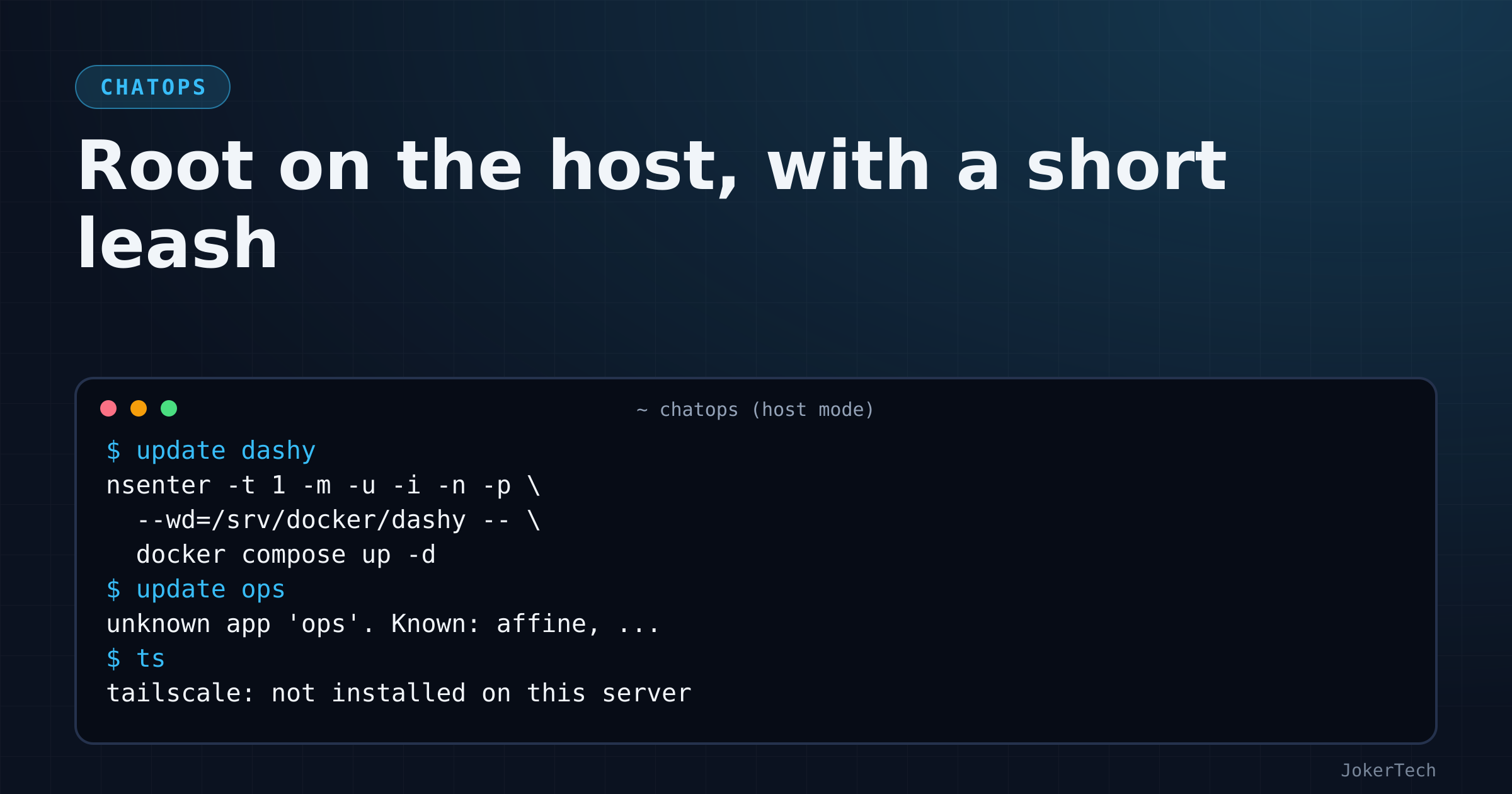
The ts command is broken. It runs tailscale status on the host, and since this move Tailscale isn't on the host; it lives in the chatops_tailscale container. Through nsenter, ts should now answer tailscale: not installed on this server. Its test still passes, because the test puts a fake tailscale on the PATH. The journal command's allowlist also still offers tailscaled and selfhosted-chatops as units, both from the systemd era. None of this is dangerous; all of it is untidy, and the stale docstring is the same family.
What I've seen on the real server, and what I haven't
The listener runs on the VPS and answers from the phone, so the basic chain works: messages in, nsenter, host commands, replies out. Things I know ran for real, because they produced bug reports: check (it counted a 404 as healthy, which I asked to change to 2xx-only), the NocoBase commands (the limited API key hit 403s my admin key had hidden), and a stop that reached the code check and was refused because I'd used the wrong authenticator entry.
What I haven't seen yet is a destructive command go all the way through nsenter on the real host: no reboot, no aptupgrade, no prune, no successful stop. I believe they work, because nsenter gives you the same thing a root shell does, and the offline tests assert the exact argv, for example that update dashy becomes:
nsenter -t 1 -m -u -i -n -p --wd=<repo>/dashy -- docker compose up -dBut belief isn't a test run. aptupgrade in particular runs apt-get -y -o Dpkg::Options::=--force-confold upgrade with DEBIAN_FRONTEND=noninteractive, passed through nsenter's environment, and if a package ever asks a question the non-interactive frontend can't answer, I'd rather find out at a desk.
There's also a question from the very first README I haven't answered. It had a note that git pull run as root in a repo owned by another user is refused with git's "dubious ownership" error, and the fix was to mark the repo as a safe.directory. The current README dropped that note when the listener moved into Docker. If it bites, the first update from the phone will tell me, in a message that's at least easy to read.
What I'd do differently
I'd write the "which machine am I talking about" question into the code explicitly instead of discovering it command by command: a single list of everything that must run on the host, everything that must run in the container, and a test that fails if a new command doesn't say which. The ts leftover and the /proc accident are both symptoms of not having that.
And I'd fix the docstring. It's three lines, and it has been telling every reader of the file the opposite of the truth for two days.