
Patched, Redeployed, Hacked Again: How a Docker Image Kept Un-patching WordPress
We cleaned a compromised WordPress site, redeployed, and were breached again two hours later. The cause wasn't a new zero-day. It was our own Dockerfile.
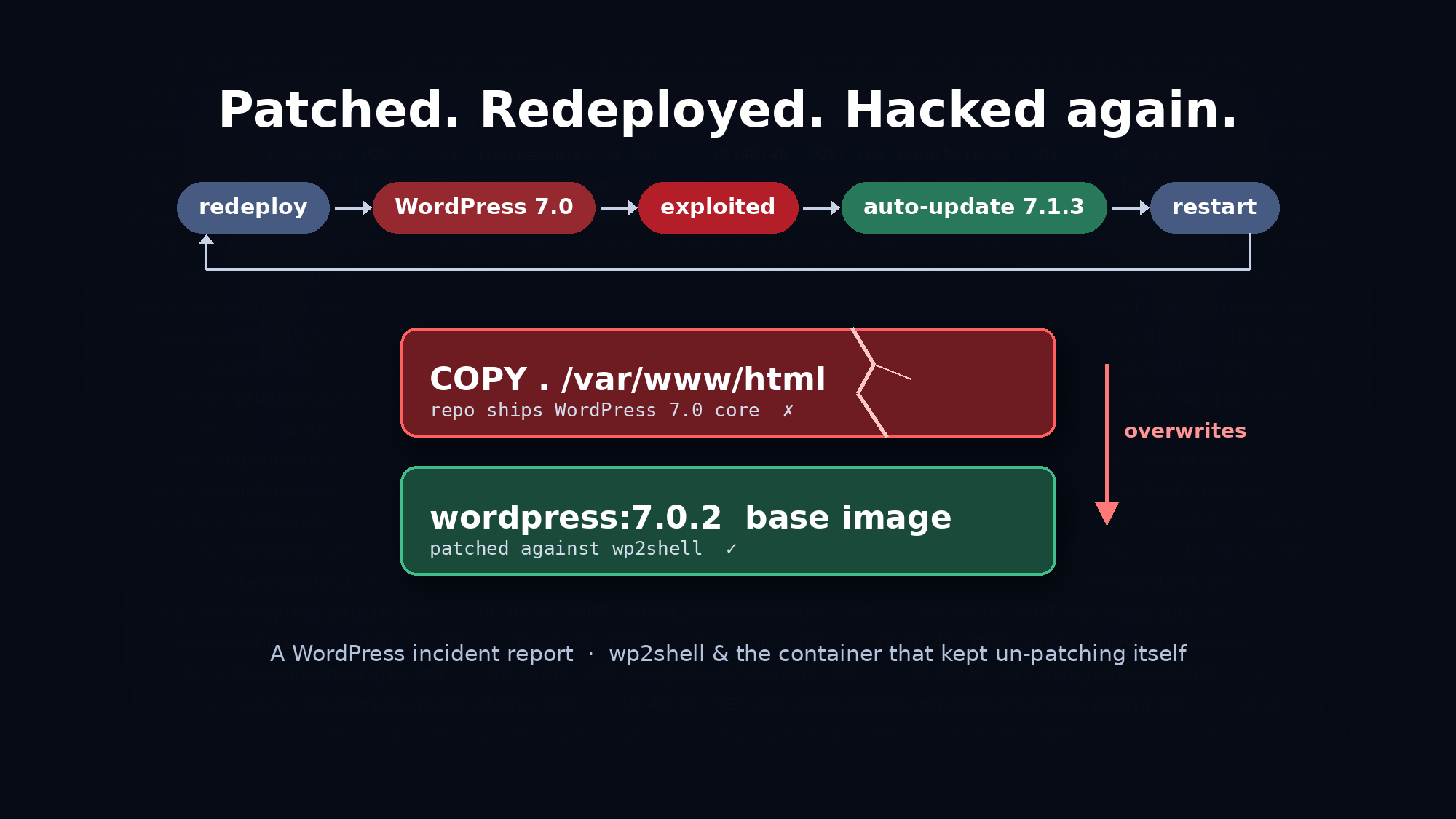
Last week we handled a WordPress compromise for a hospitality client. On the surface it was a textbook case: a known, critical vulnerability, rogue admin accounts and webshells. What made it worth writing about is what happened after the cleanup. We redeployed, and the site was breached again two hours later, through the same hole we thought we had closed.
The cause wasn't a new zero-day. It was our own deployment pipeline.
The vulnerability: wp2shell
The entry point was wp2shell, a pair of chained flaws in WordPress core itself, tracked as CVE-2026-63030 and CVE-2026-60137, that together form a pre-authentication remote code execution path requiring no plugins, no special configuration, and no credentials. falconinternet
In short, an attacker sends crafted requests to the REST API batch endpoint (/wp-json/batch/v1, or /?rest_route=/batch/v1). That gives them an SQL injection, which they use to create an administrator account. They then log in and upload a "plugin" that is actually a webshell. The whole chain is automated.
The fix shipped in WordPress 7.0.2, and our container image was built on wordpress:7.0.2. So we should have been safe.
What the logs showed
Once we pulled the web server logs, the attack pattern was hard to miss:
- Bursts of 9–11 POST requests to the batch endpoint within about 30 seconds, every one answered with HTTP 207. Normal sites almost never see 207 on that route.
- A new administrator account created in the database at the same second as the last request in each burst.
- Shortly after: a successful login (302 on
wp-login.php), thenupdate.php?action=upload-plugin, then calls to a freshly uploaded plugin folder namedwp2shell_<random>.
Accounts created by the public exploit tool are easy to spot. They're named wp2_<hex>, with an email at @wp2shell.invalid. We found several, and the webshell plugin also had a delete_user feature, so the tool could remove its own temporary account after use.
The exploit also leaves fingerprints in wp_posts. Each run created a customize_changeset post backdated to 2020-01-01, a request post with status parse named reentry-N, and a couple of oembed_cache entries. Because the reentry-N numbers increment, they tell you how many successful runs there have been.
What the attackers left behind
Over about two weeks, several unrelated actors used the same hole:
- Around a dozen rogue administrator accounts.
- A webshell plugin that ran any shell command passed in the URL, behind a secret token.
- A hidden folder in
wp-content/plugins/containing about 20 backdoors, with names chosen to look like core files (class-wp-hook.php,wp-cache.php7,wp-util.phtml). The unusual extensions were there to slip past filters that only look for.php. - A file manager plugin installed as a persistence tool, plus an unknown file planted inside a legitimate, active premium plugin.
- Files dropped straight into the web root. These included a 538 KB webshell disguised as
wp-update.php, an admin-creation script, a folder namedsql(possibly a staged database dump), and a Google Search Console verification file.
The twist: the container that kept un-patching itself
We cleaned everything, rebuilt and redeployed. Two hours later, the logs showed the same 207 bursts from a new IP, and a new admin account appeared at the same second.
Checking the version told the story:
bash
# Inside the freshly deployed container
wp core version
# 7.0

grep wp_version /usr/src/wordpress/wp-includes/version.php
# $wp_version = '7.0';
The image was declared as FROM wordpress:7.0.2, but it ran WordPress 7.0. These Dockerfile lines explain why:
dockerfile
COPY . /var/www/html/
COPY . /usr/src/wordpress/
The project repository contained a full copy of WordPress core (wp-admin/, wp-includes/, root wp-*.php files), committed months earlier when the project started on 7.0. Every build copied the repo on top of the patched base image and silently replaced 7.0.2 with 7.0. Running wp core verify-checksums --version=7.0 against the image confirmed that core was effectively stock 7.0.
Two more factors hid the problem.
WordPress kept patching itself, temporarily. Automatic background updates upgraded the running container to the latest release within hours. If you checked the admin dashboard on a good day, you saw a current version. But the update only lived inside that container. The next restart, redeploy or scale-out brought back the 7.0 baked into the image.
Persistent storage kept the backdoors. Plugins lived on a mounted share so they would survive restarts. The startup script seeded that share from the image with cp -r, which adds and overwrites files but never deletes them. Backdoors on the share survived every "clean" redeploy, and the attackers' accounts survived in the database.
So the cycle was redeploy → WordPress 7.0 → exploited → auto-update hides it → restart → back to 7.0.
Other weaknesses that made it worse
Our review of the container turned up more problems:
- Code writable by the web server.
FS_METHODwas set todirect, the code was owned bywww-data, and the startup script ranchmod -R a+wonwp-content. Any webshell could write anywhere. - A hardcoded SSH root password. This follows Azure App Service's documented pattern, and the port isn't exposed to the internet. But inside the container, any webshell is one known password away from root.
- Every secret in environment variables, readable by any PHP code, including the database password.
- Repository files published in the web root, such as
azure-pipelines.ymlandMakefile, becauseCOPY .copied everything and there was no.dockerignore.
What we changed
1. Never commit WordPress core to your repository. Ship only what you own: theme, custom plugins, mu-plugins, config. Add wp-admin/, wp-includes/ and the root wp-*.php files to both .gitignore and .dockerignore.
2. Fail the build if core doesn't match the official release:
dockerfile
RUN grep -q "wp_version = '7.1" /var/www/html/wp-includes/version.php \
 && wp core verify-checksums --path=/var/www/html --allow-root \
      --exclude=wp-config-docker.php
If anything ever overwrites core again, the pipeline goes red instead of production.
3. Treat the image as the source of truth. Pin a current base tag and rebuild on every WordPress security release. Disable in-container updates (WP_AUTO_UPDATE_CORE set to false, plus DISALLOW_FILE_MODS and DISALLOW_FILE_EDIT), because updates made inside a container are lost and only give false confidence.
4. Keep only uploads on persistent storage. Ship plugins in the image. If they must live on a share, seed with a mirror that deletes extra files (rsync -a --delete), never cp -r.
5. Block the exploit at the edge as defence in depth. Deny /wp-json/batch/v1, /index.php/wp-json/batch/v1 and rest_route=/batch (including the URL-encoded form) at the WAF. Add a server-level Apache rule that the web user can't edit:
apache
<If "%{REQUEST_URI} =~ m#batch/v1#i || %{QUERY_STRING} =~ m#rest_route=(/|%2F)batch#i">
    Require all denied
</If>
6. Restrict admin access. Limit wp-login.php, xmlrpc.php and /wp-admin/ to known IPs, but keep admin-ajax.php public if front-end forms use it. On its own, this doesn't stop wp2shell, because the exploit never touches the login page. It does shut down password guessing, which we also saw: over 2,000 attempts in 13 minutes.
7. Monitor and retain. Alert on new administrator accounts and plugin installs, and keep web logs for at least 90 days. Our first exploitation predated the oldest log we could get.
Check your own site
Look for HTTP 207 responses on the batch endpoint in your logs:
kusto
AppServiceHTTPLogs
| where CsUriStem has "batch/v1" or CsUriQuery has "batch/v1"
| where ScStatus == 207
| project TimeGenerated, CIp, CsUriStem, CsUriQuery, UserAgent
Look for the exploit's leftovers in the database (adjust the table prefix):
sql
SELECT ID, post_type, post_name, post_modified_gmt
  FROM wp_posts
 WHERE post_type IN ('customize_changeset','request')
    OR post_name LIKE 'reentry%'
 ORDER BY post_modified_gmt;

SELECT user_login, user_email, user_registered
  FROM wp_users
 WHERE user_email LIKE '%wp2shell.invalid'
    OR user_registered > NOW() - INTERVAL 30 DAY;
And check what is actually running, not just what your Dockerfile says:
bash
wp core version
wp core verify-checksums
If those two disagree with your FROM line, you have the same problem we did.
Takeaways
- The
FROMline is a statement of intent, not a guarantee. Anything copied afterwards can quietly undo it. - Auto-updates in ephemeral containers create false confidence. The site looks patched until the next restart.
- "Clean and redeploy" isn't a fix if the root cause lives in the build. We fixed the symptoms twice before finding it.
- Know your persistence layers (database, shared storage, image) and clean each one deliberately.
- Personal data was likely exposed, since the SQL injection gives read access to the whole database, including form submissions. Under GDPR, involve your Data Protection Officer early: notification deadlines start when you become aware of a breach.
The vulnerability got the attackers in. Our own build pipeline let them back in.
References: Wiz – Exploitation in the wild of wp2shell · Bitdefender – Technical advisory: wp2shell · WordPress 7.1.3 security release