
The Paperwork Nobody Tells You About Before Publishing a Nextcloud App
A signing certificate for the Nextcloud app store isn't self-service: you submit a CSR as a GitHub pull request and wait for a maintainer to sign it, days rather than minutes, and the CN has to exactly match your immutable app id.
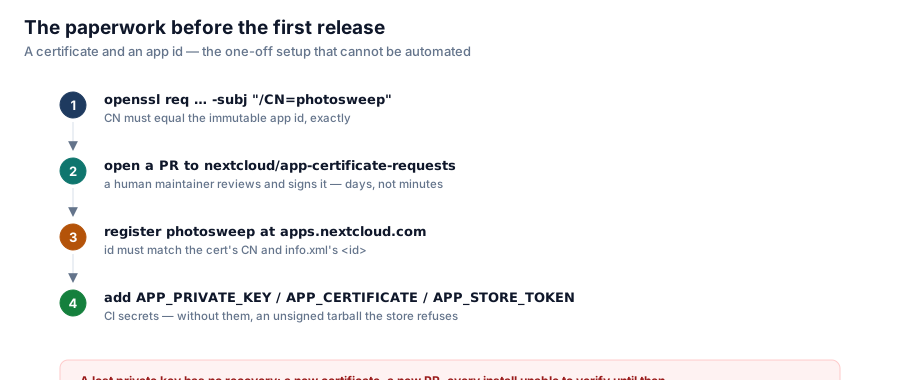
Publishing a Nextcloud app looks, from the README's install instructions, like a solved problem: git clone, npm run build, occ app:enable. Getting it into the store the way most users will actually install it — Apps → search → Download and enable — is a one-off, manual process with a human in the loop, and it's worth doing days before you plan to release, not the day of.

A lost private key has no recovery: a new certificate, a new PR, every install unable to verify until then.
Step one: a certificate whose CN is your app id, exactly
openssl req -nodes -newkey rsa:4096 -keyout photosweep.key -out photosweep.csr \
        -subj "/CN=photosweep"
The CN field has to equal the app id character for character — photosweep, not Photo Sweep, not photo-sweep. The store checks this at verification time, so getting it wrong means redoing the whole request. The app id itself is a hard constraint: [a-z]+[a-z0-9_]*[a-z0-9]+, lowercase letters, digits and underscores only, no hyphens — which is why a repository named photo-sweep can't double as the app id.
Step two: a pull request, reviewed by a stranger
There's no self-service signing form. You open a PR against nextcloud/app-certificate-requests adding your CSR, with a link to your repository in the description, and a Nextcloud maintainer reviews it and commits the signed certificate back. This is the step that takes days rather than minutes — it's a volunteer looking at a stranger's request, not an API call — and it's the one piece of the whole pipeline that cannot be automated or rushed.
Step three: registering the id
Separately from the certificate, the app id itself has to be registered at apps.nextcloud.com under Developer → Register app, and it has to match both the certificate's CN and the <id> element in appinfo/info.xml. Three places, one string, and a mismatch anywhere fails validation rather than silently working.
Step four: CI secrets, and what happens without them
APP_PRIVATE_KEY      contents of photosweep.key
APP_CERTIFICATE      contents of photosweep.crt
APP_STORE_TOKEN      your app store API token
The release workflow is written to keep working without these — it still builds, packages, and tars the app, and publishes an unsigned artifact labeled as such. That's deliberate: it means the pipeline can be tested end to end in a fork with zero configuration, and a contributor without access to the signing key can still verify their changes build a correct release. The app store itself will refuse an unsigned upload, which is the actual gate — the workflow's job is to make the failure obvious and contained to the one step that needed a secret, not to fail the whole build for everyone.
The one irreversible mistake to avoid
The private key has no recovery path. Lose it, and the fix is: ask Nextcloud to revoke the old certificate, submit a new CSR, wait for another PR to be reviewed and merged — and in the meantime every existing installation of the app fails signature verification. The docs are blunt about where the key should live: a password manager as a file attachment, and a second offline copy on something that survives losing the machine and every cloud account at once. Not in the repository — .gitignore already refuses *.key and *.crt as a safety net, but a .gitignore entry is not a backup strategy.
The release itself, once all this exists
git tag v1.0.1
git push origin v1.0.1
That's the entire repeatable half. The workflow checks the tag against info.xml — a mismatch fails the build rather than shipping a mislabelled release — builds the frontend, signs the package contents with occ integrity:sign-app, tars it, and posts the download URL and detached signature to the app store API. The one-time paperwork is the expensive part; everything after it is one command.
Series: Photo Sweep.